| Windows Media Player |
| |
| Copying a CD |
| |
| We can copy a music CD onto the hard dis or simply the songs that we like best to add on to our list |
| |
| To copy a CD we need to check the box that is next to the song that we want to copy and then click on Rip music. |
| |
| When it begins to copy the songs it will show you the progress of the process. |
| |
If you want to copy the entire CD you need to select all the songs (Ctrl+E), and click  and then click on Rip music. and then click on Rip music. |
| |
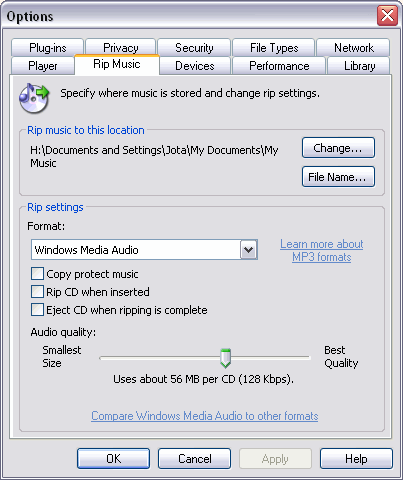
| The folder where the songs are saved to is usually in c:\My documents\My Music but we can tell it that we want to save them on another folder. To do this before you click Rip music display the menu Tools and select Options... |
| |
| A window similar to the one shown will open. |
| |
 |
| |
| To indicate where we want it to copy the songs we have selected we can click on the Change... button, then we will tell where we want it and click OK. |
| |
| We can even change the quality with which we want the music to copy by dragging the bar Audio quality. |
| |
| One of the new features is the capability to copy a song while listening to it, although this increases the copy time. |
| |
| |
|
| |
| |


