| Accessibility Option |
| |
| Adjusting Taskbar and Menu Options |
| |
| Keep the Taskbar on Top of Other Windows |
| |
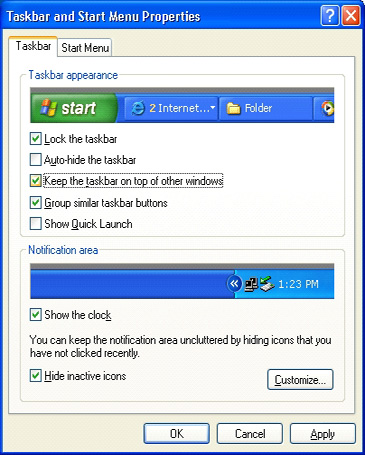
| If you want to make sure that the Windows XP taskbar is always visible, even when you run a program in a maximized (full–screen) window, select the Keep taskbar on top of other windows option. This procedure tells you how to select this option through Taskbar and Start Menu Properties in Control Panel. |
| |
 |
| |
| Control Panel >> Taskbar and Start Menu >> Taskbar tab >> Keep the taskbar on top of other windows. |
| |
| |
| Customize the Start Menu |
| |
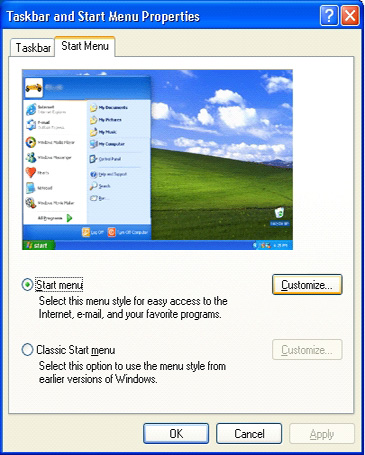
| You can choose several options to customize your Start menu including selecting large icons and specifying the number of programs you want to display on your Start menu. The size of icons and number of items on the Start menu can benefit people with vision impairments and cognitive/learning disorders. This procedure tells you how to customize the Start menu through Taskbar and Start Menu Properties in Control Panel. |
| |
 |
| |
| Control Panel >> Taskbar and Start Menu >> Start Menu tab >> Customize button. |
| |
| |
|
| |
| |


