| Accessibility Option |
| � |
| Using Narrator |
| � |
| Turn On and Use Narrator |
| � |
| Narrator is a text-to-speech utility for people who are blind or have low vision. Narrator reads what is displayed on the screen葉he contents of the active window, menu options, or text that has been typed. This procedure tells you how to turn on and use Narrator. |
Note: Narrator is designed to work with Notepad, WordPad, Control Panel programs, Internet Explorer, the Windows desktop, and some parts of Windows Setup. Narrator may not read words aloud correctly in other programs. Narrator has a number of options that allow you to customize the way screen elements are read. |
| � |
| � |
| To continue customizing Narrator, see one or more of the following step by step tutorials: |
| � |
| Set Narrator to Announce Events on Screen. |
| � |
| Set Narrator to Read Typed Characters. |
| � |
| Set Narrator to Move Mouse Pointer to Active Item. |
| � |
| Start Narrator Minimized. |
| � |
| Set Narrator Voice Options. |
| � |
 |
| � |
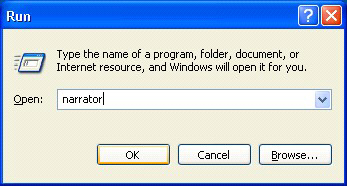
| Start >> Run >> Open >> Narrator. |
| � |
| � |
 |
| � |
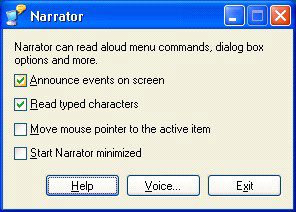
| Narrator >> Settings. |
| � |
| � |
| Set Narrator to Announce Events on the Screen |
| � |
| Narrator is a text-to-speech utility for people who are blind or have low vision. Narrator reads what is displayed on the screen葉he contents of the active window, menu options, or text that has been typed. You can select from a number of Narrator options. This procedure shows you how to set Narrator to announce when new windows are opened on screen. |
| � |
| Note: Narrator is designed to work with Notepad, WordPad, Control Panel programs, Internet Explorer, the Windows desktop, and some parts of Windows Setup. Narrator may not read words aloud correctly in other programs. Narrator has a number of options that allow you to customize the way screen elements are read. |
| � |
| � |
| Set Narrator to Read Typed Characters |
| � |
| Narrator is a text-to-speech utility for people who are blind or have low vision. Narrator reads what is displayed on the screen葉he contents of the active window, menu options, or text that has been typed. You can select from a number of Narrator options. This procedure shows you how to set Narrator to read typed characters aloud. |
| � |
| Note: Narrator is designed to work with Notepad, WordPad, Control Panel programs, Internet Explorer, the Windows desktop, and some parts of Windows Setup. Narrator may not read words aloud correctly in other programs. Narrator has a number of options that allow you to customize the way screen elements are read. |
| � |
| � |
| Set Narrator to Move Mouse Pointer to the Active Item |
| � |
| Narrator is a text-to-speech utility for people who are blind or have low vision. Narrator reads what is displayed on the screen葉he contents of the active window, menu options, or text that has been typed. You can select from a number of Narrator options. This procedure shows you how to set Narrator to move to the active item and to read it aloud. |
| � |
| Note: Narrator is designed to work with Notepad, WordPad, Control Panel programs, Internet Explorer, the Windows desktop, and some parts of Windows Setup. Narrator may not read words aloud correctly in other programs. Narrator has a number of options that allow you to customize the way screen elements are read. |
| � |
| � |
| Start Narrator Minimized |
| � |
| Narrator is a text-to-speech utility for people who are blind or have low vision. Narrator reads what is displayed on the screen葉he contents of the active window, menu options, or text that has been typed. You can select from a number of Narrator options. This procedure shows you how to select the Start Narrator minimized option so it will be easily accessible on the Windows taskbar. |
| � |
| Note: Narrator is designed to work with Notepad, WordPad, Control Panel programs, Internet Explorer, the Windows desktop, and some parts of Windows Setup. Narrator may not read words aloud correctly in other programs. Narrator has a number of options that allow you to customize the way screen elements are read. |
| � |
| � |
|
| � |
| � |


