| System Tools |
| |
| Formatting a Disk |
| |
| To Format a Disk: |
| |
| 1- Open Windows Explorer or click on My Computer, then select the unit you wish to format with the right mouse button to display the shortcut menu. |
| |
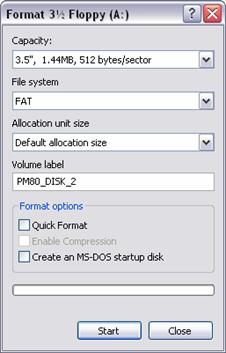
| 2- Select the Format option, and a window like the one shown here will be displayed. |
| |
 |
| |
| 3- Select Capacity of the disk; nowadays the majority are 1.44 Mb for Floppy. |
| |
| 4- In the File System for floppies you can only choose FAT. For hard disks you can choose FAT, which is the most used system to date, or NTFS, which is newer and has more restoration and error analysis capabilities. |
| |
| 5- Select Format options, Quick Format or create a an MS-DOS start up disk. |
| |
| 6- You can also label it: simply write the name where the Volume label appears. |
| |
| 7- Once the appropriate options have been selected click Start. |
| |
| 8- When you finish click Close. |
| |
| |
|
| |
| |


