| Adding/Removing Programs |
| |
| Modifying or Removing Programs |
| |
| To Modifying or Removing a Program: |
| |
| • Click on the Start button and choose Control Panel. |
| |
| • Click on Add or Remove Programs option. |
| |
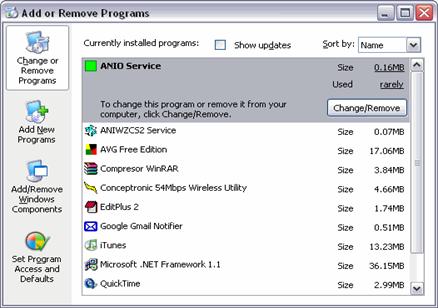
| A window will display with the three basic options shown on the left side of the picture as it appears below: |
| |
 |
| |
| Note: On this screen the installed programs in our computer are displayed |
| |
| • Then click on Change or Remove Programs. |
| |
| The Modify or delete programs option is shown on the upper left corner because it is the option that is most often used. On this screen the installed programs in our computer are displayed |
| |
| To select the program we want to change or remove we have to click on it. On the image above ANIO Service appears highlighted. |
| |
| For Animated Presentation (With Voice)Click Here. |
| |
| |
|
| |
| |


