| Adding/Removing Programs |
| |
| Adding New Programs |
| |
To Add New Programs:
|
 |
• Click on the Start button and choose Control Panel.
• Click on Add or Remove Programs option.
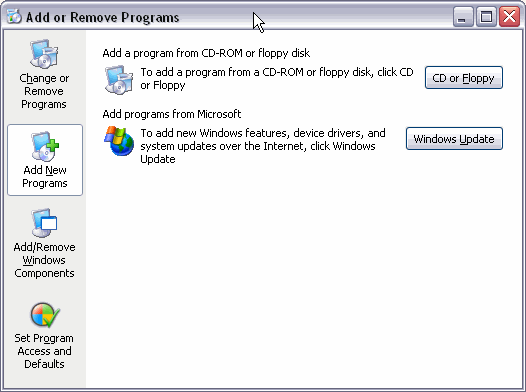
A window will display with the three basic options shown on the left side of the picture as it appears below. |
|
| |
 |
| |
| • Then click on Add New Programs. |
| |
| In this option we have two basic possibilities: |
| |
| 1 - Adding programs from a CD-ROM or floppy |
| |
| 2 - Add Program by Windows Update |
| |
| If the program we want to install is on a CD-ROM or on a floppy we will click on the CD or Floppy button and a screen will appear prompting us to introduce the CD or floppy in the corresponding drive. |
| |
| From that moment the assistant will guide us during the installation process. Normally it will ask us questions regarding where the program is to be installed, we recommend accepting the folder that it suggests. |
| |
| Hint: It can also ask us what options of the program we want to install, for example, if we want a traditional installation, minimal, or complete. |
| |
| For Animated Presentation (With Voice)Click Here. |
| |
| |
|
| |
| |


