| Mouse Configuration |
| |
| The Pointer |
| |
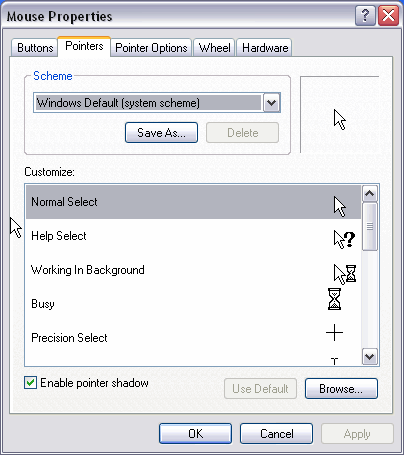
| On the Pointers tab we can choose the type of pointer the mouse is to have when it moves, when it is busy, when it is used, etc. |
| |
 |
| |
| |
| In the Scheme option chooses the group of pointers you like best. |
| |
| In the Customize section there is a list of the different movements with their respective pointers. If you do not like a pointer you can change it by selecting it, clicking on browse, and once you find the pointer you like, click OK. |
| |
| You can create your own combination of pointers and save it with its own name. Once you have the style set up, click on Save as and giving it a name. Now when you want to use it you simply need to look for it by the name you gave it. |
| |
| Just as new styles can be created they can also be deleted by selecting the style and clicking Delete. |
| |
| If you modify any of the predetermined styles and you wish to use the original, click on Use default and the style will go back to its original set up. |
| |
| |
|
| |
| |


