| Screen Configuration |
| |
| The Screen Saver |
| |
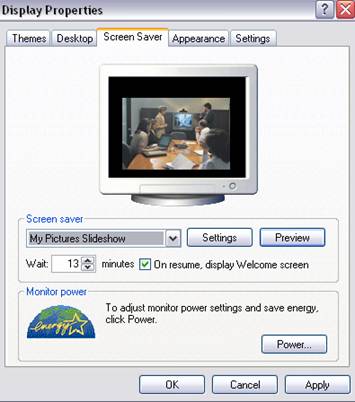
The computer remains inactive a few minutes. It is recommended to have a screensaver to avoid having a still image on the screen too long because this can damage the monitor.
From the List, choose the screensaver you like best; a small preview is shown above.
With Preview you can see how it will look once in place. When you move the mouse or press a key the preview will end. |
 |
|
| |
| You can modify the time it takes for the screensaver to appear by adjusting the time on Wait. |
| |
| The Settings button allows us to customize the image that is used as the screensaver. |
 |
| |
| |
| Depending on the image, the properties we can change vary. |
| |
| Checking On resume, password protect you can place a password protection to keep someone else from working on your account. |
| |
| Once the screensaver is engaged it will only allow you back to the normal screen once you have entered the correct user password. |
| |
| For Animated Presentation (With Voice)Click Here. |
| |
| |
|
| |
| |


