 |
 |
 |
| Desktop | |||
| Visualize the ToolBars | |||
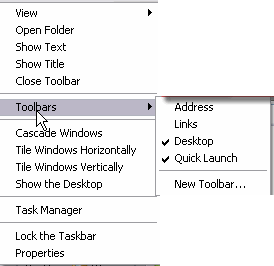
| To visualize the Tool Bars: | |||
| 1. Right click with the mouse on the task bar. | |||
| 2. Select Toolbars. | |||
| 3. From the menu that appears select the toolbars that you wish to see. | |||
| Note: If next to the option a check mark appears it means that the tool is already visible. | |||
|
|||
|
|||