| Windoes AP Explorer |
| |
| Explorer |
| |
| The Explorer is an indespensible tool in an operating system, since with it we can organize and control the files and folders of the different storage systems at our disposal such as the hard drive, disk drive etc. |
| |
| The Windows Expolrer is also known as the File Manager. Through it we can delete, see, copy, or move files and folders. |
| |
| We suggest you pay particular attention to this unit because of its great importance. |
| |
| Starting the Explorer |
| |
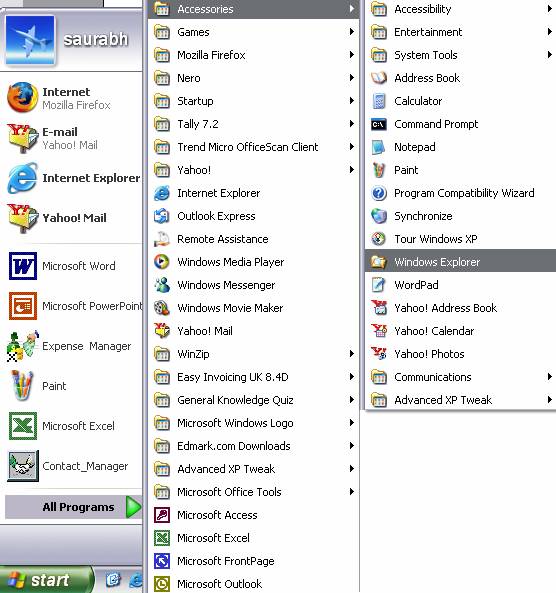
| To open Windows Explorer: |
| |
| 1. Click the Start button, located in the lower left corner of your screen. |
| |
| 2. Highlight programs. |
| |
| 3. Highlight Accessories. |
| |
| 4. Click Windows Explorer. |
| |
 |
| |
| The Explorer can also be started from the Start button by choosing My documents, My images or My music; the difference is that in these cases we will go directly to those folders. |
| |
| |
|
| |
| |


