| Introduction to Windows XP |
| |
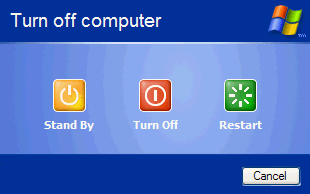
| Turn Off , Restart, Stand by Computer |
| |
 |
| |
| Shut down My Computer |
| |
| To shut down your computer: |
| 1. Click the Start button. The Start menu will appear. |
| |
| 2. Click Turn off Computer. The Turn Off Computer dialog box will appear. |
| |
| 3. Click the Turn Off icon. Your computer will shut down. |
| |
| |
| Restart My Computer |
| |
| You may need to shut down and restart your computer after installing a new program or if your system becomes unstable. |
| |
| To shut down and immediately restart your computer: |
| 1. Click the Start button. The Start menu will appear. |
| |
| 2. Click Turn Off Computer. The Turn Off Computer dialog box will appear. |
| |
| 3. Click the Restart icon. Your computer will restart. |
| |
| |
| Standby mode |
| |
When your computer is in the Standby mode, your computer consumes less electricity, but is ready for immediate use. However, if the computer loses electrical power while in the Standby mode, any information you have not saved will be lost. |
| |
| To put your computer in Standby mode: |
| |
| 1. Click the Start button. The Start menu will appear. |
| |
| 2. Click Turn Off Computer. The Turn Off Computer dialog box will appear. |
| |
| 3. Click the Stand By icon. |
| |
| For Animated Presentation (With Voice) Click Here. |
| |
| |
|
| |
| |


