| Introduction to Windows XP |
| |
| The Run Window |
| |
 |
| |
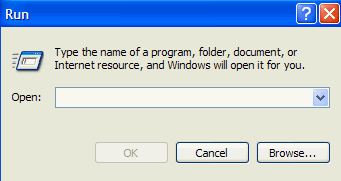
| A left-click on the Run menu item will open the Run Window. If you know the exact path of a program file, you can type that information into the box to the right of Open: and then left-click on OK or simply press Enter. |
| |
| Entering a program file will start that program. Entering a document file (from a word processor) will open that document within the word processor program. |
| |
| If you are not certain of the exact path to a file, you can browse for it by left-clicking on the browse button. This generates a dialog box with a directory structure within and allows you to search through a disk for the appropriate file. Once located, you must left-click on the file name and then left-click the Open button. This returns you to the Run window with the file and its associated path properly inserted. You may then left-click on OK or press Enter. |
| |
Clicking on the downward pointing triangle to the right of where you enter the program name will drop down a list of files that you have recently launched from the Run window. Left-clicking on one of those names will insert the program or document name properly in the Run window. You may then left-click on OK or press Enter. |
| |
| |
|
| |
| |


