| References for a Document |
| |
| Add Comments |
| |
| The comment tool in Microsoft Word 2007 is a good approach to proof-read a report or thesis paper and makes notes to you as a substitute of writing them on a sheet of paper. |
| |
| For add a comment on your document follow these steps: |
| |
| 1. Put your cursor where you would like to add the comment |
| |
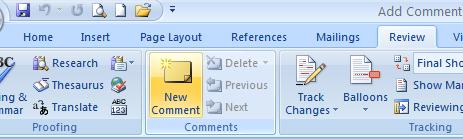
| 2. Click the Review tab on the Ribbon |
| |
| 3. Click on the New Comment Icon in Comments group. |
| |
 |
| |
| 4. Write the comment |
| |
| 5. Click anywhere on the word document. |
| |
| For Animated presentation Click here |
| |
| |
|
| |


