| References for a Document |
| |
| Add Bookmark |
| |
| A bookmark identifies a position or a collection of text that you name and classify for future reference. |
| |
| If you are working on a long Word document, which has hundreds of pages, then it will be difficult to go through the documents quickly. |
| |
| If you are working on a long Word document, which has hundreds of pages, then it will be difficult to go through the documents quickly. |
| |
| Follow these steps for add bookmark: |
| |
| 1. Click where you want to insert a bookmark. |
| |
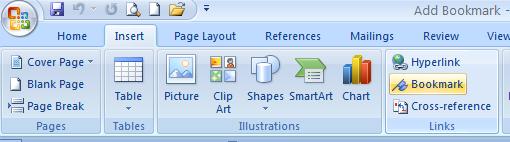
| 2. Click the Insert tab, on the ribbon |
| |
| 3. Click Bookmark in the Links group |
| |
 |
| |
| 4. Type a name under Bookmark name. Bookmark names cannot contain spaces and must begin with a letter |
| |
| 5. Click Add |
| |
| 6. Click on “Go To” to access the bookmark. |
| |
| For Animated presentation Click here |
| |
| |
|
| |


