| References for a Document |
| |
| Cross-Reference |
| |
| When you are working on a long document, a cross-reference refers to an item in another location. Such as: An academic paper. |
| |
| Microsoft Word-2007 allows you to create cross-references in documents. |
| |
| You may want to refer readers to another part of your document. |
| |
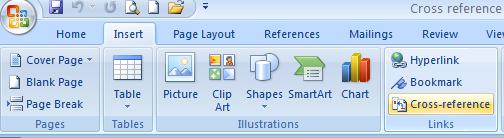
| Follow these steps to use Word 2007’s Cross-reference feature: |
| |
| 1. Place the cursor where you want to insert the cross reference |
| |
| 2. Open the Insert tab on the Ribbon |
| |
| 3. Click Cross-reference In the Links group |
| |
| 4. Click the type of item (Example: heading, footnote, bookmark...) you would like to reference from Reference type list arrow |
| |
 |
| |
| 5. Click the Insert reference to list arrow |
| |
| 6. Select the Insert as hyperlink check box |
| |
| 7. Click Insert |
| |
| 8. Close the dialog box |
| |
| For Animated presentation Click here |
| |
| |
|
| |


