| References for a Document |
| |
| Caption |
| |
| Caption point out specifics information of the document. |
| |
| The caption can clarify the object. The caption will also help you refer to the object within the document. |
| |
| You can add a caption and identifying figure number to charts, SmartArt, clip art and pictures. |
| |
| Steps for insert a Caption: |
| |
| 1. Go to the desired object in your document. |
| |
| 2. Right-click the object. |
| |
| 3. Select Insert Caption to open the Caption dialog box. |
| |
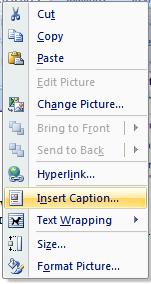 |
| |
| 4. Type your caption in the Caption textbox. |
| |
| 5. Choose the label and position from the corresponding dropdowns. |
| |
| 6. Click OK |
| |
| For Animated presentation Click here |
| |
| |
|
| |


