| References for a Document |
| |
| Citations & Bibliography |
| |
| Microsoft presents one of the new features in Word 2007 is Citation & Bibliography, for citing sources, creating a bibliography, and managing the sources. |
| |
| A bibliography is a list of sources, generally placed at the ending of a document, that you cited in building the document. |
| |
| This feature has ability to create automated citations and bibliographies that follow a particular style, such as: APA, Turabian, Chicago, etc. |
| |
| To insert a citation in the text portion of your document follow the following steps: |
| |
| 1. Click the References Tab on the Ribbon. |
| |
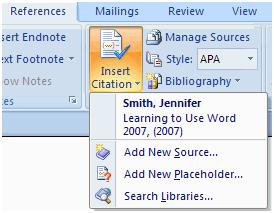
| 2. Click the Insert Citation Button on the Citations & Bibliography Group |
| |
| 3. Click Add New Source, If this is a new source |
| |
| 4. If you have already created this source, it will in the drop down list and you can click on it |
| |
 |
| |
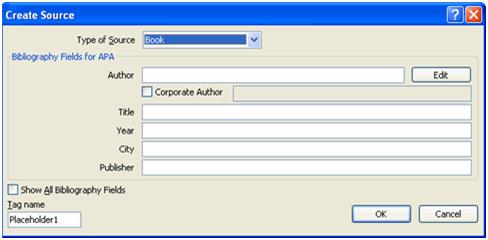
| 5. If you are creating a New Source, select the type of source (article, book, etc.) |
| |
| 6. Complete the Create Source Form |
| |
| 7. If you need extra fields, be sure to click the Show All Bibliography Fields check box |
| |
| 8. Click OK |
| |
 |
| |
| To insert a Bibliography in your document follow the following steps: |
| |
| 1. Click the References Tab on the Ribbon. |
| |
| 2. Click the Bibliography Button on the Citations & Bibliography Group |
| |
| 3. Click Insert Bibliography. |
| |
| For Animated presentation Click here |
| |
| |
|
| |


