| References for a Document |
| |
| Table of Contents |
| |
| Microsoft Office Word 2007 provides a gallery of automatic table of contents styles. |
| |
| Table of Content (T.O.C) make simpler your document creation process, Word automates the generation of a table of contents. |
| |
| When you add a table of contents to your document, Word automatically searches through it looking for items that are marked for use in the TOC. |
| |
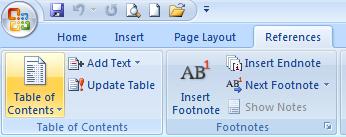
| For Insert Table of Content use the following steps: |
| |
| 1. Move the pointer of the mouse to the place where you want the Table of Contents to appear. |
| |
| 2. Click the References tab on the Ribbon. |
| |
| 3. Click the Table of Contents button found in the Table of Contents group. |
| |
| 4. Click the Table of Contents style which you want to use. |
| |
| To customize your TOC, click the Table of Contents button and select Insert Table of Contents Field. |
| |
 |
| |
| For Animated presentation Click here |
| |
| |
|
| |


