| References for a Document |
| |
| Page Number |
| |
| Page numbers help you maintain your document structured and facilitate readers to find information fast. |
| |
| Microsoft Word-2007 also offers numerous number styles from which you can select. |
| |
| You can choose where the page numbers appear. For example: Numbers can appear on the left, right, at the top of the page, or center of the page. |
| |
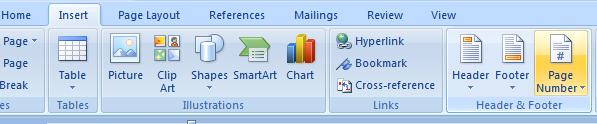
| These are the following steps, for insert page number on a word document: |
| |
| 1. Click the Insert tab on the Ribbon. |
| |
| 2. Select the Header & Footer group. |
| |
| 3. Click the “Page Number” button. |
| |
| 4. A menu appears. Select a Option where you want to insert the Page Number. |
| |
 |
| |
| For Animated presentation Click here |
| |
| |
|
| |


