| References for a Document |
| |
| Header & Footer |
| |
| In Microsoft Word you can create headers and footers, so that information (such as the author's name, document title, or page numbers) will show in the top and/or bottom margin of your word document. You can create a header and footer that appears the same on every page, or you can customize the pages with different headers and footers. |
| |
| If you don't want a header or footer on the first page, leave the areas blank.
Create a new header or footer in your second page; this will print on all subsequent pages. |
| |
| For Insert Header & Footer follow these Steps: |
| |
| 1. Click wherever in the segment of your document where you want to create a header or footer. |
| |
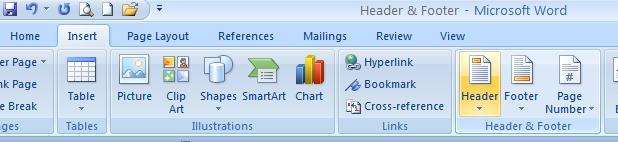
| 2. Click the Insert tab on the Word 2007 Ribbon. |
| |
| 3. In the Header & Footer group, click Header or Footer. |
| |
| 4. Click the header or footer design that you want. |
| |
 |
| |
| For Animated presentation Click here |
| |
| |
|
| |


