 |
 |
 |
| Working with Graphics | |||
| Insert Various SmartArt | |||
| A SmartArt graphic is a visual representation of your Microsoft Word-2007 document information that you can fast and simply create, choosing between many different layouts, to well communicate your message or thoughts. | |||
| Just follow these steps for inserting various SmartArt: | |||
| 1. Click the position where you want the SmartArt to appear | |||
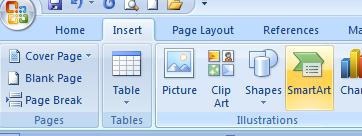
| 2. Click the Insert tab on the Ribbon. | |||
| 3. Click the Illustrations section. | |||
| 4. Click SmartArt, The SmartArt graphics list appear. | |||
| 5. In the SmartArt graphics list choose a SmartArt that you want. | |||
| 6. Click Ok. | |||
| The SmartArt appears in your document. | |||
|
|||
|
|||