|
Working with Graphics |
| |
| Insert Image from Clip Art |
| |
| Follow the followings given step for Insert Image from Clip Art: |
| |
| 1. Click the position where you want the image to appear |
| |
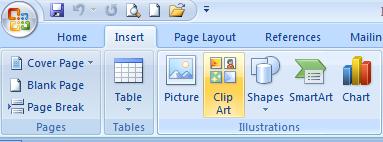
| 2. From the Insert command tab, in the Illustrations section, click Clip Art.
The Clip Art dialog box appears. |
| |
| 3. In the dialog box, write the word which you want to search. Click Go. |
| |
| 4. Choose a Clip Art Graphic. |
| |
| 5. Double Click on the selected Clip Art. |
| |
| The Clip Art appears in your document. |
| |
 |
| |
| For Animated presentation Click here |
| |
| |
|
| |


