| Drawing Tools |
| |
| Insert Word Art |
| |
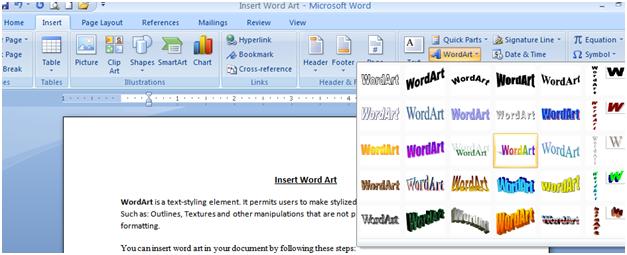
| WordArt is a text-styling element. It permits users to make stylized text with different "special effects". Such as: Outlines, Textures and other manipulations that are not presented through the standard font formatting. |
| |
| You can insert word art in your document by follow these steps: |
| |
| 1. Click the Insert tab on the Microsoft office-2007 Ribbon.. |
| |
| 2. Click the Text button. |
| |
| 3. Click Word Art. |
| |
| 4. Select a Word Art Style. |
| |
| After insert a Word Art Style you can format your Word Art with double clicking on your Word Art, which was inserted on your Word-200 document. |
| |
 |
| |
| For Animated presentation Click here |
| |
| |
|
| |


