| Revise your Word Document |
| |
| Redo the operation |
| |
| If you want to Redo something in word-2007, you must use the Redo command to set things back. |
| |
| For example: you may type some text and then use Undo to "untype" the text. You can use the Redo command to restore the typing. |
| |
| You have two choices: |
| |
| Choice 1: Press Ctrl+Y from keyboard for quick redo. |
| |
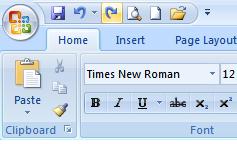
| Choice 2:Click the Redo command button on the Quick Access Toolbar. |
| |
 |
| |
| The Redo command provides two functions: |
| |
| 1. It does exactly the opposite of whatever the Undo command does. So, if you type text, Undo untypes the text, and Redo recovers the text. |
| |
| 2. If you use Undo to recover deleted text, Redo deletes the text again. |
| |
| |
|
| |


