| Revise your Word Document |
| |
| Undo the last operation |
| |
| The Undo command undoes anything you do in Word, such as formatting text, moving blocks, typing and deleting text, formatting - all of it. You can allow running free the Undo command in two helpful ways: |
| |
| One way is Press Ctrl+Z. |
| |
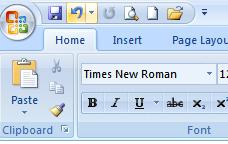
| You can also access Undo option by Click the Undo command button on the Quick Access Toolbar. |
| |
 |
| |
| An advantage of using the Undo command button is that it sports a drop-down menu that helps you evaluate the past several things you've done, or that can be undone. |
| |
| . Unfortunately, you cannot pick and choose from the Undo command button's drop-down menu; the menu simply allows you to undo multiple instances of things all at one time. |
| |
| . At periodic times, Undo doesn't work. Word warns you, though. |
| |
| For example, you may see the message "There is not enough memory to undo this operation, Continue?" Proceed at your own risk. |
| |
| . The Undo command doesn't work when there's nothing to undo, or if something simply cannot be undone. For example, you cannot undo a save-to-disk operation. |
| |
| |
|
| |


