| Revise your Word Document |
| |
| Paste the text |
| |
| If you want to Paste text in your word document, follow these steps: |
| |
| 1. Move the Cursor to the position where you want to paste the copy. |
| |
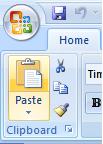
| 2. Click on the Page on Clipboard icon in the Clipboard box on the far left of the Home Tab Ribbon to paste. |
| |
 |
| |
| 3. If you want to paste your text from keyboard shortcut. Press Ctrl+V to paste from keyboard. |
| |
| 4. You can also paste from mouse right click. Press the right click, then click on highlighted text from a drop down menu and choose Paste. |
| |
| For Animated presentation Click here |
| |
| |
|
| |


