Note: To turn off italics, press Ctrl+i again. You can also remove formatting by pressing Ctrl+spacebar.
Note: To turn off the italics, select the text and click the Italicize button again.
 |
 |
 |
| Edit Text of Your Document | |||
| Italicize your text | |||
| Italicize with the Dialog Box Launcher | |||
|
|||
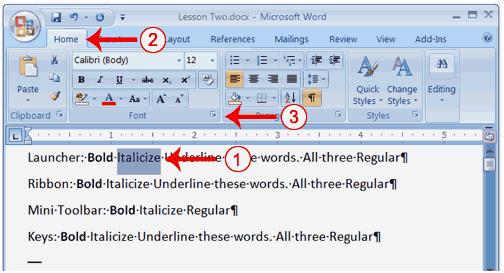
| 1. On the line that begins with Launcher, select the word "Italicize." You can place the cursor before the letter "I" in "Italicize." Press the Shift key; then press the right arrow key until the entire word is highlighted. | |||
| 2. Choose the Home tab. | |||
| 3. Click the dialog box launcher in the Font group. The Font dialog box appears. | |||
|
|||
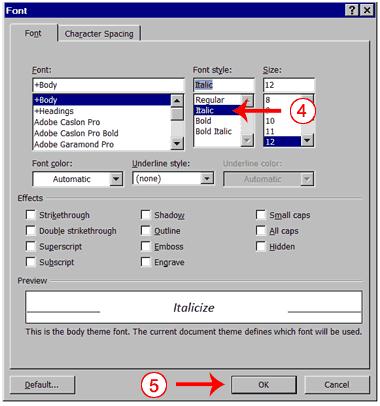
| 4. Click Italic in the Font Style box. | |||
| Note: You can see the effect of your selection in the Preview window. To turn off the italics, click Regular in the Font Style box. | |||
| 5. Click OK to close the Font dialog box. | |||
| 6. Click anywhere in the text area to remove the highlighting. You have italicized the word Italicize. | |||
| Alternate Method-Italicize with Keys | |||
| 1. On the line that begins with "Keys," select the word "Italicize." You can place the cursor before the letter "I" in "Italicize." Press the Shift key; then press the right arrow key until the entire word is highlighted. | |||
| 2. Press Ctrl+i (hold down the Ctrl key while pressing i). Note: To turn off italics, press Ctrl+i again. You can also remove formatting by pressing Ctrl+spacebar. |
|||
| 3. Click anywhere in the text area to remove the highlighting. You have italicized the word Italicize. | |||
| Alternate Method-Italicize with the Ribbon | |||
| 1. On the line that begins with "Ribbon," select the word "Italicize." You can place the cursor before the letter "I" in "Italicize." Press the Shift key; then press the right arrow key until the entire word is highlighted. | |||
|
|||
| 2. Choose the Home tab. | |||
| 3. Click the Italic button on the Ribbon. You have italicized the word Italicize. Note: To turn off the italics, select the text and click the Italicize button again. |
|||
| 4. Click anywhere in the text area to remove the highlighting. | |||
| Alternate Method-Italicize with the Mini Toolbar | |||
|
|||
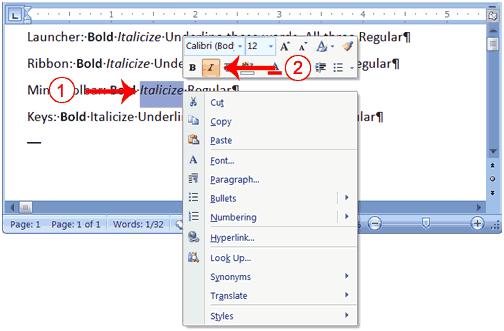
| 1. On the line that begins with "Mini Toolbar," select the word "Italicize." You can place the cursor before the letter "I" in "Italicize." Press the Shift key; then press the right arrow key until the entire word is highlighted. | |||
| 2. Right-click. The Mini toolbar appears. | |||
| 3. Click the Italic button . You have italicized the word Italicize. | |||
| For Animated presentation Click here | |||
|
|||