| Different Operation's on Document |
| |
| Open an Existing Document |
| |
| If you want to open an existing file, follow these steps: |
| |
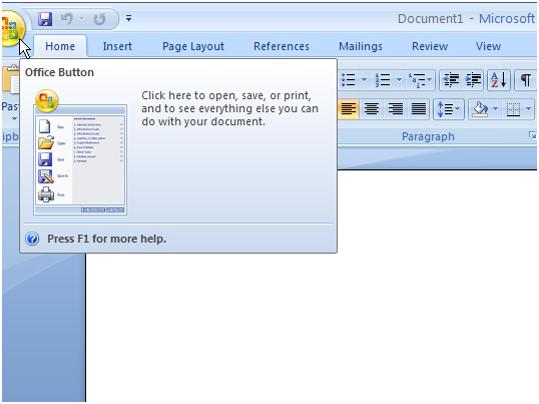
Open a File with Microsoft Office Button |
| |
| 1. Click the Microsoft Office button. A menu appears. |
| |
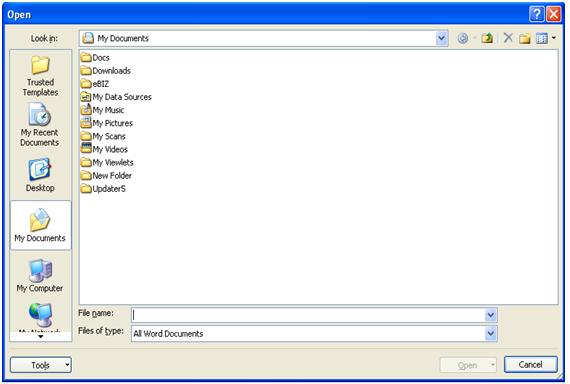
| 2. Click Open. The Open dialog box appears. |
| |
| 3. Use the Look In field to move to the folder in which you saved the (.docx or .doc) file. |
| |
| 4. Click .docx or .doc file |
| |
| 5. Click Open. |
| |
 |
| |
| Alternate Method-Opening a File with Shortcut Keys |
| |
| 1. Open Word 2007. |
| |
| 2. Press "Ctrl+O". |
| |
| 3. Locate the folder in which you saved your (.docx or .doc) file. |
| |
| 4. Click .docx or .doc file. |
| |
| 5. Click Open. |
| |
 |
| |
| Alternate Method-Opening a Recently used file |
| |
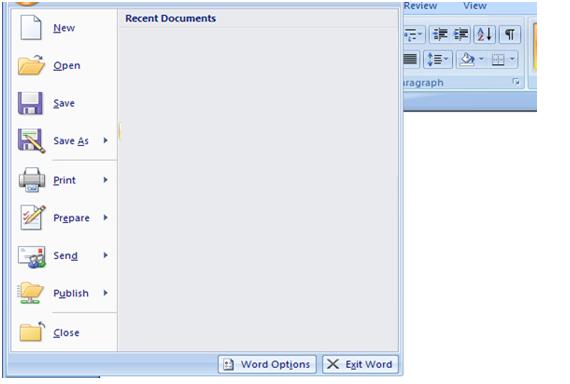
| . If you have recently used the document you can click the Microsoft Office Button and click the name of the document in the Recent Documents section of the window Insert picture of recent docs. |
| |
 |
| |
| For Animated presentation (With Voice)Click here |
| |
| |
|
| |


