| Different Operation's on Document |
| |
| Create Your First Document |
| |
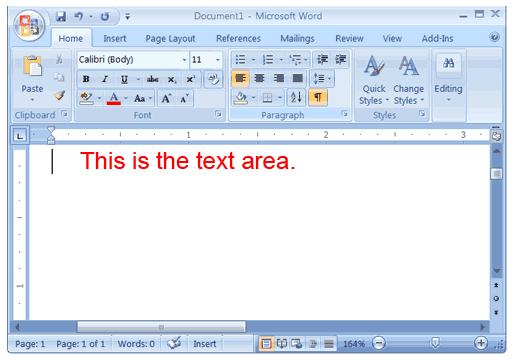
| When you open Microsoft Word 2007, you see a document which is completely blank. This looks like a piece of paper and takes up the largest part of the screen space. |
| |
| For creating your first document, you can Start with the Ribbon and the cursor |
| |
| The Ribbon spans the top of Word, on top of the document. You make use of commands and buttons on the Ribbon to notify Word what you would like to do. |
| |
| Word waits for you to begin typing. The cursor (a blinking vertical line in the upper-left corner of the page) shows where the content you type appears on the page. |
| |
 |
| |
| Press the ENTER key on your keyboard if you want to start typing further down the page instead of at the top, until the cursor is where you want to type. |
| |
| Press the TAB key on your keyboard, if you want to indent the first line you type. This will move the cursor one-half inch to the right. |
| |
| As you start type, the cursor moves to the right side. When you get to the end of a line on the right side of the page, just continue to type. Word will move on to the next line for you as you type. |
| |
| To start a new paragraph, press ENTER. |
|
| |
| |
|
| |


