| Working with Slide |
| |
| PowerPoint View |
| |
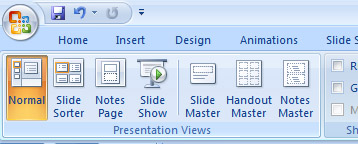
| In PowerPoint-2007, you can display your presentations in one of four main different views. |
| |
| These are normal, Slide Sorter, Notes Pages, Slide show. |
| |
| To access all the different slide presentation views follow these steps: |
| |
| 1. Click on View tab. |
| |
| 2. Go to Presentation views. |
| |
| 3. Click any one of the view which you want. |
| |
 |
| |
| After click on a view type, the view of the slide will be changed. |
| |
| You can also change view directly from the status bar. |
| |
| For Animated presentation Click here |
| |
| |
|
| |


