| Working with Slide |
| |
| Copying a Slide |
| |
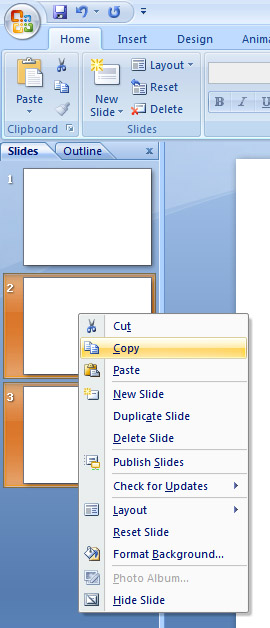
| When you want copy one or more slides in your PowerPoint Presentation follow these steps: |
| |
| 1. Go to the pane that contains the Slides and Outline tabs |
| |
| 2. Click the Slides tab. |
| |
| 3. Select that slide which you want to copy. |
| |
| 3. If you want to paste your text from keyboard shortcut. Press Ctrl+V to paste from keyboard. |
| |
| . To select a single slide, click on that slide. |
| |
| . To select various in order slides, click the first slide, then press SHIFT, and then click the last slide that you want to select. |
| |
| . To select various inconsequential slides, press CTRL, and then click each slide that you want to select. |
| |
| 4. Press Right-click of one of the selected slides |
| |
| 5. Click Copy. |
| |
 |
| |
| For Animated presentation Click here |
| |
| |
|
| |


