| Working with Slide |
| |
| Deleting a Slide |
| |
| If you want to remove a slide from your presentation, you can follow these steps: |
| |
| 1. Go to the Slides tab of the task pane (Slides / Outline) on the left of your screen. |
| |
| 2. Click on the thumbnail of the slide, which you want to delete. |
| |
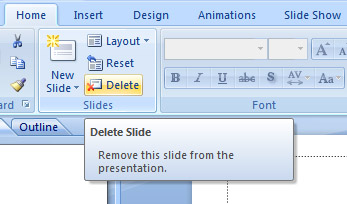
| 3. Click on Home Tab on the ribbon. |
| |
| 4. Go to Slides group. |
| |
 |
| |
| 5. Click on Delete. |
| |
| The slide will be deleted from the presentation. |
| |
| You can also delete slide by pressing Delete key on the keyboard. |
| |
| For Animated presentation Click here |
| |
| |
|
| |


