| Working with Slide |
| |
| Adding a Slide |
| |
| Microsoft PowerPoint-2007 provides two separate features on adding a New Slide.
The default slide layouts for a new add slide is the Title and Content type of slide. |
| |
| When you want to insert a new slide in your presentation, you can follow these steps: |
| |
| 1. Click on Home Tab on the ribbon. |
| |
| 2. Go to Slides group. |
| |
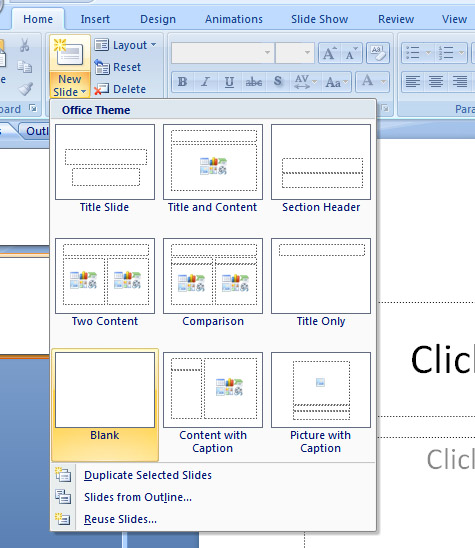
| 3. Click on New Slide. |
| |
| A List of slides will be open. |
| |
 |
| |
| 4. Click any type of slide from the list of slides. |
| |
| The New Slide will be inserted on your PowerPoint Presentation. |
| |
| For Animated presentation Click here |
| |
| |
|
| |


