| Modifying a Content |
| |
| Bullet and Numbered List |
| |
| In Microsoft PowerPoint-2007, Bullet lists have bullet points and Number lists have numbers. |
| |
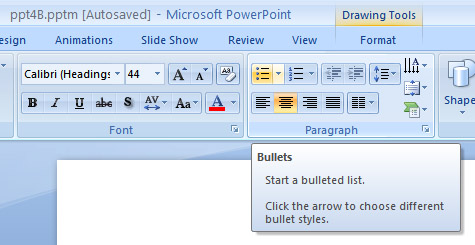
| To add a list to existing text follows the following steps: |
| |
| 1. Select the text you wish to make a list |
| |
| 2. From the Paragraph Group on the Home Tab, Click the Bulleted or Numbered Lists button. |
| |
 |
| |
| To create a new list, follows the steps given below: |
| |
| 1. Place your cursor where you want the list in the document |
| |
| 2. Click the Bulleted or Numbered Lists button |
| |
| 3. Start typing. |
| |
| For Animated presentation Click here |
| |
| |
|
| |


