| Make a Start with PowerPoint |
| |
| "Save as" an Existing Presentation |
| |
| To "Save As" a PowerPoint Presentation you will use the following Steps: |
| |
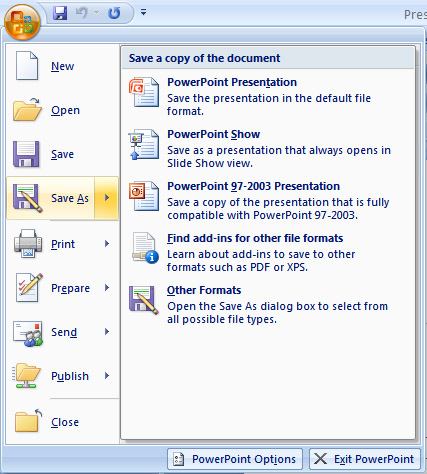
1. Click the Microsoft Office Button |
| |
| 2. Click Save As. (remember, if you're sending the document to someone who does not have Office 2007, you will need to click the Office Button, click Save As, and Click PowerPoint 97-2003 ) . |
| |
| 3. Specify the correct folder in the Save In box. |
| |
| 4. Name your document by typing in the File Name box. |
| |
| 5. Click Save. |
| |
 |
| |
| To save the presentation using a different name Click Save As. The Save As dialog box appears. Use the File Name box to give your document a new name. |
| |
| For Animated presentation Click here |
| |
| |
|
| |


