 and find the file you want to rename.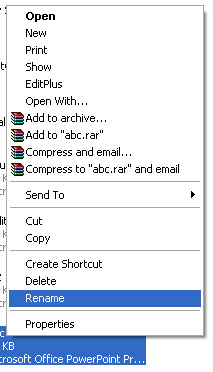
 |
 |
 |
| Make a Start with PowerPoint | |||
| Renaming a Document | |||
| To rename a Power Point Presentation while using the program: | |||
| 1. Click the Microsoft Office Button and find the file you want to rename. |
|||
| 2. Right-click the document name with the mouse and select Rename from the shortcut menu. | |||
| 3. Type the new name for the file and press the ENTER key. | |||
|
|||
|
|||