Syntax: resource mysql_list_dbs ( [resource link_identifier ] )
int mysql_num_rows ( resource result )
mysql_num_rows() returns the number of rows in a result set.
string mysql_tablename ( resource result, int i )
<?php
//PHP Code to retrieve the list of databases in MySQL.

class dbUtils{
	private $list_db;
	private $total_db;
	private	$list_of_dbs;

	public function  __construct(){

	}
	public function connect(){
		$con=mysql_connect("localhost","root","");
		if(!$con)
			return NULL;
		else
			return $con;

	}
	public function listDB()
	{
		$con=$this->connect();

		if(!$con)
			 $this->list_db="<b>Unable t
o Connect to MySQL ".mysql_error()."</b>";
		else
		{
			#echo "<b>Connection Created Successfully.</b>";

			$total_db=mysql_list_dbs($con)or die(mysql_error());
			$i=0;
			$list_of_dbs="<ul type=\"disc\">";
			if($total_db)
			{
				for($i;$i<mysql_num_rows($total_db);$i++)
				{
					$db_list[$i]=mysql_tablename($total_db,$i);
					$list_of_dbs.="<li>$db_list[$i]</li>";
				}

			}
			$list_of_dbs.="</ul>";
			mysql_close($con)or die(mysql_error());
			return $list_of_dbs;
		}
	}
}

?>

<!DOCTYPE HTML PUBLIC "-//W3C//DTD HTML 4.0 Transitional//EN">
<?php
$dbutil=new dbUtils();
?>
<HTML>
<HEAD>
<TITLE>PHP Tutorial: Working with MySQL</TITLE>
</HEAD>

<BODY>
<hr>
<h3>List  of Databases on localhost</h3>
<hr>
<FIELDSET>
	<LEGEND>Databases</LEGEND>
	<?php
	echo $dbutil->listDB();
	?>

</FIELDSET>
</BODY>
</HTML>
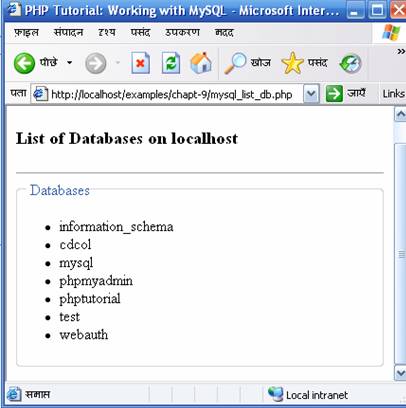
After connecting to database we have created a variable to hold the result of the mysql_list_dbs() function.
$list_of_dbs.="<li>$db_list[$i]</li>";
}
$db_list .= "</ul>";
?>
<?php
//PHP Code to retrieve the list of databases in MySQL.


$con=mysql_connect("localhost","root","") ;
$list_db;
if(!$con)
	 die ("<b>Unable to Connect to MySQL ".mysql_error()."</b>");
else
{
	#echo "<b>Connection Created Successfully.</b>";

	$total_db=mysql_list_dbs($con)or die(mysql_error());
	$i=0;
	$list_of_dbs="<ul type=\"disc\">";
	if($total_db)
	{
		//Main loop to retireve the l
ist of databases on  the MySQL server
		for($i;$i<mysql_num_rows($total_db);$i++)
		{
			$db_list[$i]=mysql_tablename($total_db,$i);
			$list_of_dbs.="<li>$db_list[$i]";
			$tables=mysql_list_tables($db_list[$i]);
			$list_of_tables="<ul>";
			$i1=0;
			if($tables)
			{
	//For Loop to retireve list of tables in current database
	for ($i1;$i1<mysql_num_rows($tables);$i1++)
				{
			$table_list[$i1]=mysql_tablename($tables,$i1);
			$list_of_tables.="<li>$table_list[$i1]</li>";
				}
				$list_of_tables.="</ul>";
				$list_of_dbs.="$list_of_tables </li>";
			}

		}

	}
	$list_of_dbs.="</ul>";
	mysql_close($con)or die(mysql_error());
}

?>

<!DOCTYPE HTML PUBLIC
"-//W3C//DTD HTML 4.0 Transitional//EN">
<HTML>
<HEAD>
<TITLE>PHP Tutorial: Working with MySQL</TITLE>
</HEAD>

<BODY>
<hr>
<h3>List  of Databases on localhost</h3>
<hr>
<FIELDSET>
	<LEGEND>Databases</LEGEND>
	<?php
	echo $list_of_dbs;
	?>

</FIELDSET>
</BODY>
</HTML>
 |
 |
 |