<?php
class dbUtils{
	private $flag;
	private $sql;//="create database ";
	private $msg;//="";*/
	#function createDB
	public function __construct(){
		$this->flag=0;
		$this->sql="";
		$this->msg="";
	}
	public function connect(){
		$con=@mysql_connect("localhost","root","");
		if(!$con)
			return NULL;
		else
			return $con;
	}
	function createDB($db_to_create)
	{
		$msg="";
		$flag=$this->flag;
		if((!$db_to_create)|| ($db_to_create==""))
			$flag=-1;
		if(isset($_POST["submit"])&& ($flag >=0)){
			$sql="create database ".$db_to_create;
			$con=$this->connect();
			if($con){
				$result=mysql_query($sql,$con);
				if($result)
	{
	$msg.="Database <b>$db_to_create</b> create successfully.";
					$flag=0;
					//return $msg;
				}
				elseif(!$result)
				{
$msg.="Unable to create database $db_to_create ";
					$msg.=mysql_error();
					$flag=-1;
					//return $msg;
				}
				if($flag<0)
	$msg.="\n<br>Unable to create database <b>
  $db_to_create</b>\n<br /> Please Enter a
valid database name to create";
				mysql_close($con);
				//echo $msg;
				return $msg;

			} else{
			$msg="Unable to connect to database";
			return $msg;
			}
		}
	}
}
?>
<html xmlns="http://www.w3.org/1999/xhtml">
<head>
<script>
function validateForm()
{
	var db=document.form1.db_name
	if((db.value=="")||(db.value.length==0))
	{
	alert("Please enter Name of the database to create")
	db.focus()
	return false
	}

return true
}
</script>
<meta http-equiv="Content-Type"
content="text/html; charset=iso-8859-1" />
<title>PHP Tutorial: Working with MySQL</title>
</head>

<body>

<form action="<?php echo $PHP_SELF;?>
" method="post" name="form1" onSubmit="return validateForm();">
  Enter database name to create
<input type="text" name="db_name" maxlength="10" size="20">

  <br>
  <input name="submit"
 type="submit" value="Create Database">
</form>
<hr>
<?php
if(isset($_POST["submit"]))
{
?>
<div style="border:thin #FF0000
solid; width:80%; height:auto">
<?php
$db=$_POST["db_name"];
$dbutil=new dbUtils();
echo $dbutil->createDB($db);
echo "</div>";
}
?>
</body>
</html>
$db_to_create=$_POST["db_name"];
2. Create an object of dbUtils class
$dbutil=new dbUtils();
3. Call the createDB function of dbUtils class and pass
$db_to_create $dbutil->createDB($db_to_create);
4. in the createDB function of dbUtils class, check if the database name is blank.
5. Create a variable to hold the query to issue, which will create the new database:
$sql = "CREATE database ".$db_to_create;
6. Add the connection information just as you have been doing:
$con = $this->connect();
7. Check connection is established with database or not
if($con){
7. Issue the query, using the mysql_query() function.
$result = mysqlquery($sql, $con);
8. Check if result is initialized and return the result.
if($result){
Note:
The concept of $PHP_SELF variable and isset() function
has been described in the previous chapter.
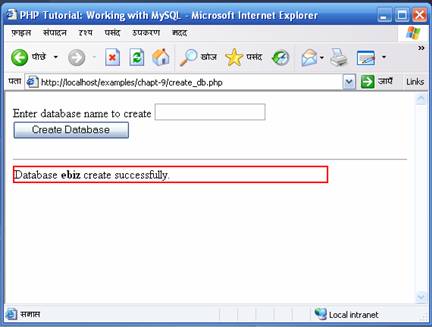
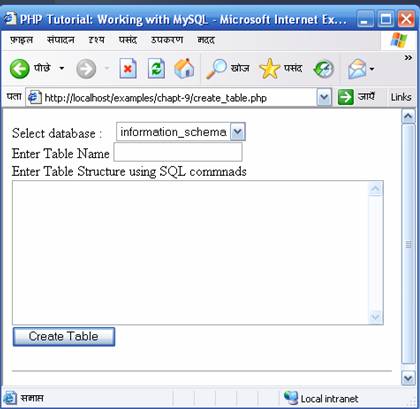
<?php
$list_of_dbs="";
function  getDBList($element_type, $param1)
{
$con=mysql_connect("localhost","root","") or die("Unable to Connect");
$total_db=mysql_list_dbs($con)or die(mysql_error());
	$i=0;

	if($total_db)
	{
		//Main loop to retireve the list of databases on  the MySQL server
		for($i;$i<mysql_num_rows($total_db);$i++)
		{
			$db_list[$i]= mysql_tablename($total_db,$i);
			$list_of_dbs.="<$element_type $param1=\"$db_list[$i]\"
>$db_list[$i]</$element>";
		}
	}
mysql_close($con) or die(mysql_error());
return $list_of_dbs;
}

?>
<?php
require("listdb.php");
$db=$_POST["db_name"];
$command=$_POST["table_command"];
$table_name=$_POST["tbl_name"];
$con=mysql_connect("localhost","root","") or die();

$flag=0;
$sql="create table ";
$msg="";
if((!$db)|| ($db=="")||(strlen($command)
<=5)||($command=="")||(strlen
($table_name)<=0)||($table_name==""))
	$flag=-1;


if(isset($_POST["submit"])&& ($flag >=0)){

	$sql.=$table_name;
	$sql.=$command;

	if($con)
	{
		mysql_select_db($db, $con);
		#echo $sql;
		$result=mysql_query($sql,$con);
		if($result)
		{
			$msg.="Table <b>$table_name</b
> create successfully.";
			$flag=0;
		}
		elseif(!$result)
		{
			$msg.="Unable to create table $table_name ";
			$msg.=mysql_error();
			$flag=-1;
		}
		if($flag<0)
		$msg.="\n<br>Unable to create table <b>
$table_name</b>\n<br />
Please Enter a valid database name to create";
		mysql_close($con);
	}


}
?>
(
Id int not null auto_increment primary key,
name varchar(50),
address varchar(50),
email varchar(100)
)
 |
 |
 |