| Working with Database |
| |
| Creating a Connection |
| |
| Before you can access and work with data in a database, you must create a connection to the database. |
| |
| In PHP, mysql_connect() function is used to connect to database .
Syntax of mysql_connect: |
| |
| $con=mysql_connect("localhost/ip", "user_name", "password"); |
| |
| MySQL localhost |
| |
| If you've been around the internet a while, you'll know that IP addresses are used as identifiers for computers and web servers. In this example of a connection script, we assume that the MySQL service is running on the same machine as the script. |
| |
| When the PHP script and MySQL are on the same machine, you can use localhost as the address you wish to connect to. localhost is a shortcut to just have the machine connect to itself. If your MySQL service is running at a separate location you will need to insert the IP address or URL in place of localhost. Please contact your web host for more details if localhost does not work. |
| |
| Example: |
| |
| Source code of mysql_connect.php |
| |
<!DOCTYPE HTML PUBLIC "-//W3C//DTD HTML 4.0 Transitional//EN">
<HTML>
<HEAD>
<TITLE>PHP Tutorial: Working with MySQL</TITLE>
</HEAD>

<BODY>
<hr>
<?php
$con=mysql_connect("localhost","root","") ;
if(!$con)
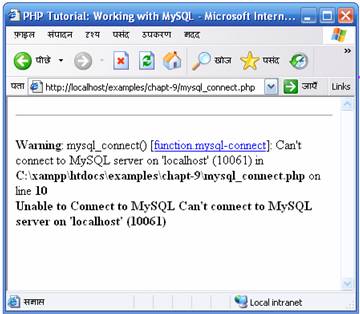
	 die ("<b>Unable to Connect to MySQL ".mysql_error()."</b>");
else
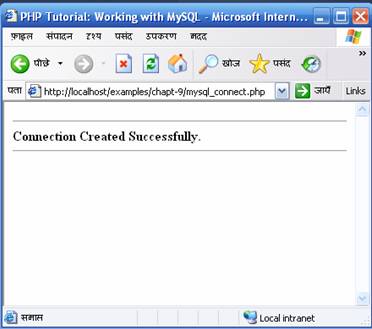
	echo "<b>Connection Created Successfully.</b>";

mysql_close($con)or die(mysql_error());
?>
<hr>
</BODY>
</HTML>
|
| |
|
The above example attempts to connect to MySQL database. If connection is established then print the success message like the one below |
| |
 |
| |
| Otherwise displays the mysql error. |
| |
 |
| |
| |
|
| |
| |


