| Working with Forms |
| |
| Creating Simple HTML form |
| |
| HTML Forms |
| |
| What makes the Web so interesting and useful is its ability to disseminate information as well as collect it, primarily through an HTML-based form. These forms are used to encourage site feedback, facilitate forum conversations, collect mailing addresses for online orders, and much more. But coding the HTML form is only part of what's required to effectively accept user input; a server-side component must be ready to process the input. |
| |
| Note: |
| |
| This is an simplified example to educate you how to use PHP to process HTML form information. This chapter does not describe forms in details or in simple words this isn't a HTML form tutorial. In this chapter we will just tell you that how to obtain and process the information that your site user has entered in the form. For HTML tutorial, please visit out XHTML/HTML tutorial at http://education.ebizelindia.com. |
| |
| Creating a Simple HTML Form |
| |
| In this example, we will create a simple form, which will accept user input and when user click on submit button sends the information to the server side PHP script to process the information. |
| |
| This example is divided in two parts: |
| |
1. Client side HTML form [simpleform.php]
2. Server side form processing script [simpleform.php] |
| |
| Source code simpleform.php |
| |
<html>
<head>
<meta http-equiv="Content-Type" content="text/html; charset=windows-1252" />
<title>PHP Tutorial: Working with Forms</title>
</head>

<body><form  name="simple" action="simpleform.php" method="get">
<table width="200" border="1" cellpadding="1">

  <tr>
    <th scope="row">Name</th>
    <td><input name="name" type="text" id="name" accesskey="n" /></td>
  </tr>
  <tr>
    <th valign="top" scope="row">Address</th>
    <td><textarea name="address" cols="40"
rows="5" id="address" style="background-color:#34FFDD"></textarea></td>
  </tr>
  <tr>
    <th scope="row">
      <input type="reset" name="Reset" value="Reset"
style="background-color:#0066CC; border:
thin dotted solid #003333; cursor:wait; size:16; color:#FFFFFF" /></th>

    <td><input name="Submit" type="submit" id="Submit"
style="background-color:#0066CC; border: thin dotted solid #003333;
cursor:hand; width:150px; size:16; color:#FFFFFF" value="Submit" /></td>
  </tr>

</table></form>
</body>
</html>
|
| |
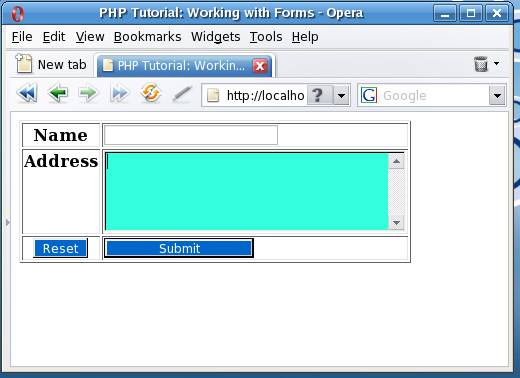
| The example HTML page above contains two input fields and a submit button. When the user fills in this form and click on the submit button, the form data is sent to the "simpleform.php" file.
The above page should look like the figure given below: |
| |
|
| The server side script: |
| |
| source of simpleform.php |
| |
<html >
<head>
<title>Hello <?php echo $_GET["name"];?> </title>
</head>

<body>
<hr />
<center><h3>Hello  User </h3></center>
You have entered the following information:
<p>Your Name <b> <?php echo $_GET["name"];?></b>
<br />
Your Address <address><?php echo $_GET["address"];?></address>
</p>
</body>
</html>
|
| |
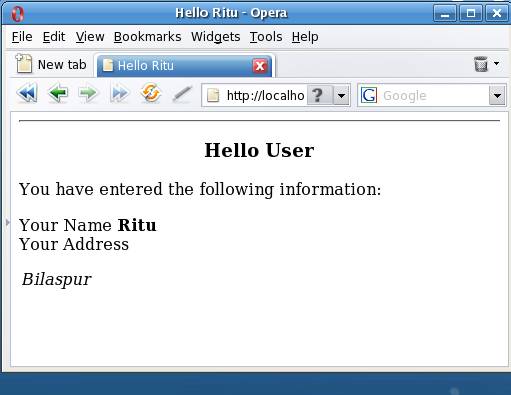
| Now open the simpleform.php in browser, fill the form and press submit the form to view the output.
Your output should be like one given below: |
| |
|
| |
| As you can see, we have used the following syntax to retrieve the value that we have entered in the from. |
| |
| There are two common methods for passing data from one script to another: |
| |
| 1. GET and
2. POST. |
| |
| Syntax to access value of a form field: |
| |
| if the method is GET: |
| |
$_GET["form_field_name"];
if the method is POST
$_POST
["form_field_name"]; |
| |
| In the above example GET method is used to make the example verbose. You can use any method as per your choice and requirement. But, GET method is not recommended for that contains sensitive information such as Login form, form that accepts credit card information, etc and form that accepts lengthy data. |
| |
| Although GET is the default, you'll typically want to use POST because it's capable of handling considerably more data, an important behavior when you're using forms to insert and modify large blocks of text. If you use POST, any posted data sent to a PHP script must be referenced using the $_POST syntax. |
| |
| For example, suppose the form contains a text-field value named email that looks like this: |
| |
| <input type="text" id="email" name="email" size="20" maxlength="40" /> |
| |
| Once this form is submitted, you can reference that text-field value like so: |
| |
| $_POST['email'] |
| |
| Of course, for sake of convenience, you can first assign this value to another variable, like so: |
| |
| $email = $_POST['email']; |
| |
| But following the best practice of never presuming user input will be safe, you should filter it through one of the several functions capable of sanitizing data, such as htmlentities(), like so: |
| |
| $email = htmlentities($_POST['email']); |
| |
| The htmlentities() function converts strings consisting of characters capable of maliciously modifying an HTML page should the user-submitted data be later published to a Web site, such as a Web forum. |
| |
| |
|
| |
| |


