| Working with Forms |
| |
| More Complex Form |
| |
| In this example we will create a self submitting form, which accept user input process the information and display the output, and all in one page. |
| |
| Step-by-Step description: |
| |
<body>
<?php
$name=$_POST["name"];
$email=$_POST["email"];
$mobile=$_POST["mobile"];
$addr=$_POST["address"];
$own=$_POST["own"];
$state=$_POST["state"];
$sex=$_POST["sex"];
$feedback=$_POST["feedback"];
$owns=array();
|
| |
| if (!isset($_POST['submit'])) { //if the form is not submitted we will display the form itself. Otherwise display the contents of the form.
?> |
| |
| In the section we have declared variables to store the values of form fields. In the last line of the above declaration we have used isset() function to check if the form has been submitted. If user has submitted the form, then it will jump directly to else part. |
| |
| The else part |
| |
<?php
}
else
{
?>
<h3> Dear <?php echo $name;?>, thank
you very much for your valuable Feedback</h3>
<hr />
You have  entered following information :<br />

<?php
	echo "<pre>";
	echo  "Name <b>".$name."</b><br />";
	echo  "Contact No".$mobile."<br />";?>
"EMail Address " <a href="mailto:
<?php echo $email;?>"> <?php echo $email;?></a>
Your Have <b><?php  foreach ($own as $x=>$val){
#if (!$x=="none")
		echo "<br>".$val;

	}


?>
</b>
<?php 	echo  "Your address is  ".$address ."     ".$state;
	echo "<br />  And You are a  $sex ";
	?>

<b>eBIZ Education thanks you for
your valuable suggestion and feedback. </b>
<?php
}
?>
|
| |
| In the else part we are just printing the value entered by user. As you can see above, this part will only execute if the has submitted the form. |
| |
| The complete Code... |
| |
| Click here to view the code [Link the feedback.php.txt] |
| |
<html xmlns="http://www.w3.org/1999/xhtml">
<head>
<meta http-equiv="Content-Type"
 content="text/html; charset=windows-1252" />
<title>EBIZ EDUCATION FEEDBACK</title>
<style type="text/css">
<!--
body {
	background-color: #0099CC;
	margin-left: 0px;
	margin-top: 0px;
}
-->
.red{
color:#FF0000;
font-style:italic;
}
.fields
{
background-color:#34FFDD;
color:#333366
}
.feedback{
background-color:#006699;
color:#FFFFFF;
font-weight:bold;
}
</style>


</head>

<body>
<?php
$name=$_POST["name"];
$email=$_POST["email"];
$mobile=$_POST["mobile"];
$addr=$_POST["address"];
$own=$_POST["own"];
$state=$_POST["state"];
$sex=$_POST["sex"];
$feedback=$_POST["feedback"];
$owns=array();

if (!isset($_POST['submit'])) {
?>

<hr />
<h3> Welcome to eBIZ Education Feedback Page </h3>
<hr />

<span class="red"><b>* </b> fields are mandatory </span>
<form action="<?php  echo $PHP_SELF;?>" method="POST"
 enctype="application/x-www-form-urlencoded"
 name="feedback" target="_self" dir="ltr" lang="en">
<table width="70%" border="0" cellspacing="0" cellpadding="1">
  <tr>
    <td  width="30%">Name</td>
    <td width="70%" colspan="2">
<input name="name" type="text" size="30" />
 <span class="red"><b>* </b> </span> </td>
    </tr>
  <tr>
    <td valign="top">email ID </td>
    <td colspan="2"><input name="email"
 type="text" size="35" maxlength="100" />
 <span class="red"><b>* </b> </span></td>
  </tr>
  <tr>
    <td valign="top">Mobile no </td>
    <td colspan="2"><input name="mobile" type="text"
 class="fields" size="25" maxlength="13" /></td>
  </tr>
  <tr>
    <td valign="top">Address </td>
    <td colspan="2"><textarea name="address"
cols="40" rows="5" class="fields"></textarea></td>
    </tr>
	<tr>
    <td valign="top">State</td>
    <td colspan="2"><select name="state"  >
		<option>Please Select  State</option>
		<option value="A.P.">A.P.</option>
		<option value="A.S.">A.S.</option>
		<option value="B.R.">B.R.</option>
		<option value="C.G.">C.G.</option>
      <option value="U.P.">U.P.</option>
      <option value="D.L.">Delhi</option>
      <option value="Other">Other</option>
    </select></td>
    </tr>
  <tr>
    <td>Gender </td>
    <td><label>
      <input name="sex" type="radio" value="Male"  accesskey="M" />
      Male</label></td>
    <td><label>
      <input name="sex" type="radio" value="Female"  accesskey="F" />
      Female</label></td>
  </tr>
  <tr>
    <td>Which of Following do you own ?</td>
    <td colspan="2"><table width="100%" border="0"
 cellspacing="0" cellpadding="1">
      <tr>
        <td><input type="checkbox" name="own[]"  value="car"/>Car</td>
        <td> <input type="checkbox" name="own[]"
value="computer"/>Computer </td>
      </tr>
      <tr>
        <td><input type="checkbox" name="own[]"  value="mobile"/>Mobile</td>
        <td><input type="checkbox" name="own[]"  value="none"/>None</td>
      </tr>
    </table></td>
    </tr>
  <tr>
    <td> </td>
    <td colspan="2"> </td>
  </tr>
  <tr>
    <td valign="top">Feedback
 <span class="red"><b>* </b> </span></td>
    <td colspan="2" valign="top">
<textarea name="feedback" cols="45" rows="10" class="feedback">
</textarea> </td>
  </tr>
  <tr>
    <td><input name="reset" type="reset"
value="Clear Form" /></td>
    <td colspan="2"><input name="submit"
 type="submit" value="Submit Form" /></td>
    </tr>
</table>

</form>

<?php
}
else
{
?>
<h3> Dear <?php echo $name;?>, thank you
very much for your valuable Feedback</h3>
<hr />
You have  entered following information :<br />

<?php
	echo "<pre>";
	echo  "Name <b>".$name."</b><br />";
	echo  "Contact No".$mobile."<br />";?>
"EMail Address " <a href="mailto:<?php echo $email;?>">
 <?php echo $email;?></a>
Your Have <b><?php  foreach ($own as $x=>$val){
#if (!$x=="none")
		echo "<br>".$val;

	}


?>
</b>
<?php 	echo  "Your address is  ".$addr ."     ".$state;
	echo "<br />  And You are a  $sex ";
	?>

<b>eBIZ Education thanks you for
your valuable suggestion and feedback. </b>
<?php
}
?>
<br />
<hr />

</body>
</html>
|
| |
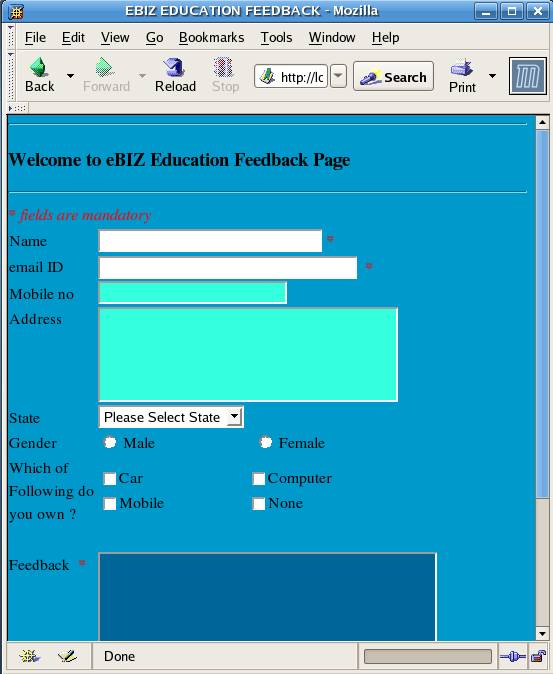
| save the file as feedback.php and open the script to view the output. The page should look like the one given below: |
| |
|
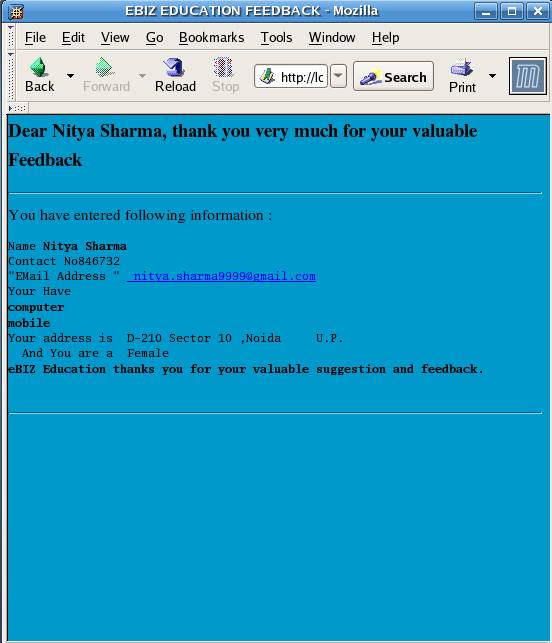
| When User Fills the form and submit it, user will get the following screen. |
| |
 |
| |
| Click here to view the Form. |
| |
| |
|
| |
| |


