| Query |
| |
| Selecting Records by condition |
| |
| Where keyword |
| |
| Often, it is not all of the records in a table that are of interest, but only those that satisfy one or more conditions. Such conditionals are introduced with WHERE. |
| |
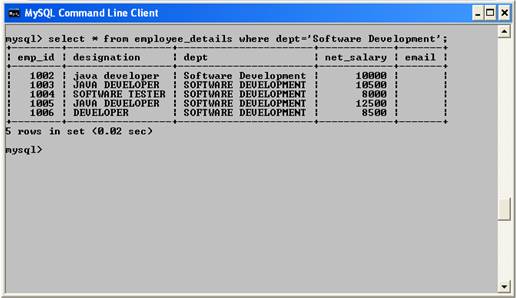
| In our first example, we wish to display the records of only those employees who belongs to Software Development department: |
| |
| select * from employee_details where dept='Software Development'; |
| |

|
| |
 |
| |
| |
| Like keyword |
| |
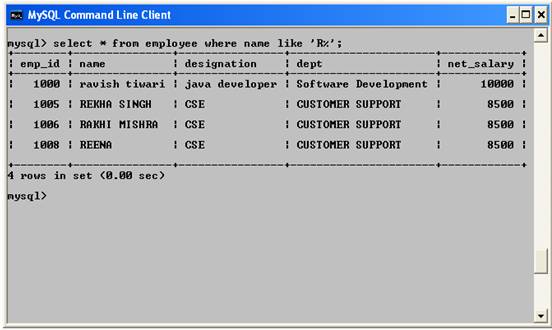
| In our second example, we employ the operator LIKE to compare character strings. The query determines all employees whose names begin with 'R'. With the operator LIKE, the character % serves as a placeholder for an arbitrary character string. |
| |
| select * from employee_details where name like 'R%'; |
| |
 |
| |
| |
| HAVING keyword |
| |
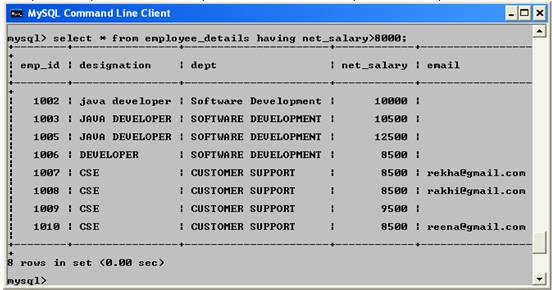
| Instead of formulating conditionals with WHERE, you could instead use HAVING. The WHERE conditionals are executed first, while HAVING conditionals are used only on intermediate results (returned by WHERE). The advantage of HAVING is that the conditions can also be applied to calculated fields (for example, to SUM(columnXy) in a GROUP BY query). An example appears in the section after next. |
| |
| select * from employee_details having net_salary>8000; |
| |
 |
| |
| |
|
|
| |
| |


