| Query |
| |
| Select Statement Revisited |
| |
| Simple Queries (SELECT) |
| |
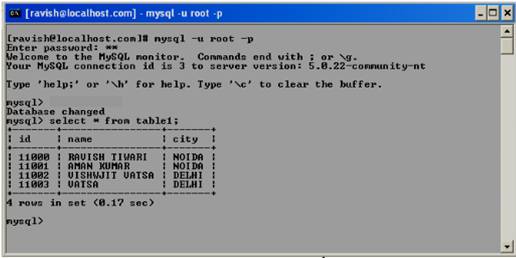
| Here is a simple database query: SELECT * FROM tablename. This query returns all data records of the table specified. The asterisk indicates that the query is to encompass all the columns of the table. |
| |
 |
| |
| First SQL experiments in MySQL monitor mysql |
| |
USE ebiz
SELECT * FROM table1 |
| |
+-------+----------------+-------+
| id    | name           | city  |
+-------+----------------+-------+
| 11000 | RAVISH TIWARI  | NOIDA |
| 11001 | AMAN KUMAR     | NOIDA |
| 11002 | VISHWJIT VATSA | DELHI |
| 11003 | VATSA          | DELHI |
+-------+----------------+-------+ |
| |
| SELECT can be used without reference to a database or to tables, for example, in the form SELECT 2*3, in which case SELECT returns its result in the form of a small table (one column, one row). This is used relatively often to determine the content of MySQL variables or functions (as in, say, SELECT NOW( ), to determine the current time). |
| |
| |
| Determining the Number of Data Records (Lines) |
| |
| Perhaps you do not have a craving to view your data records in gruesome detail, but would like merely to determine how many records there are in one of your tables. |
| |
| For that, you can use the following query: |
| |
| SELECT COUNT(id) FROM table1; |
| |
+-----------+
| count(id) |
+-----------+
|         4 |
+-----------+ |
| |
| In this query you could specify, instead of publID, any column of the table (or * for all columns). In any case, MySQL optimizes the query and returns only the number of records, without actually reading them. |
| |
| |
| Column Restriction |
| |
| Often, you are not interested in all the columns of a table. In such a case you must specify the columns explicitly (instead of using the asterisk). |
| |
| SELECT name FROM table1; |
| |
+----------------+
| name           |
+----------------+
| RAVISH TIWARI  |
| AMAN KUMAR     |
| VISHWJIT VATSA |
| VATSA          |
+----------------+ |
| |
| If a query is going to return a large number of data records, you should get accustomed to the idea of specifying explicitly only those columns of interest (instead of taking the lazy person's route of simply typing an asterisk). The reason is that MySQL (unnecessary data extraction), the client program (memory usage), and the network (unnecessary data transfer) work significantly more efficiently if the data set to be processed is limited to the absolute minimum. |
| |
| |
| Limiting the Number of Resulting Records (LIMIT) |
| |
| You can limit not only the number of columns in a query result, but also the number of data records. Imagine that your titles table contains the names of 100,000 books, but you would like to access only the first ten of these (for example, to display in an HTML document). To query the remaining 99,990 records would be a gross squandering of CPU time, memory, and network capacity. To avoid such a scenario, you can limit the number of records returned with LIMIT n. |
| |
| The following command returns two records from the titles table: |
| |
| select name from table1 LIMIT 2; |
| |
+---------------+
| name          |
+---------------+
| RAVISH TIWARI |
| AMAN KUMAR    |
+---------------+ |
| |
| To return the next two records, execute a new query, but this time with LIMIT offset, n. Here offset specifies the number of the record at which access to the table is to begin. (Warning: The enumeration of data records begins with 0. An offset of n skips the first n records and, since counting begins with 0, starts processing at record number n.) |
| |
| select name from table1 LIMIT 2,3; |
| |
+---------------------+
| name                |
+---------------------+
| VISHWJIT VATSA      |
| VATSA               |
| aman Kumar	      |
+---------------------+ |
| |
| |
| Determing the Number of Records Suppressed by LIMIT (SQL_CALC_FOUND_ROWS, FOUND_ROWS) |
| |
| When you execute a SELECT query with LIMIT, you obtain only a partial result. Particularly in the page-by-page display of data, it would often be helpful to know exactly how many records are available altogether. |
| |
| Beginning with MySQL 4.0, you can use in a SELECT query the additional option SQL_CALC_FOUND_ROWS. Then, in a second query you can evaluate the SQL function FOUND_ROWS( ), which tells how many records the query would have returned without LIMIT. |
| |
| The use of CALC_FOUND_ROWS and FOUND_ROWS is especially useful in complex queries in which a separate SELECT query for determing the number of records would be time intensive. Note, however, that the option CALC_FOUND_ROWS prevents certain kinds of optimization that MySQL carries out in LIMIT queries. Therefore, use CALC_FOUND_ROWS only when you then really wish to evaluate FOUND_ROWS. |
| |
| |
|
|
| |
| |


