SELECT table1.*, table2.* FROM table1 JOIN table2 WHERE table1.id = table2.id;
SELECT table1.*, table2.* FROM table1 CROSS JOIN table2 WHERE table1.id = table2.id;
SELECT ... FROM table1 STRAIGHT_JOIN table2;
 |
 |
 |
| Advance Querys | |||
| Using JOIN | |||
| Up to now, all of our examples with SELECT have been applied to the search for records from a single table. However, with relational databases we are usually dealing with a number of related tables. Therefore, we are usually interested in applying a SELECT command to combine data from several tables. For this we will use the JOIN syntax. | |||
| The Full Join | |||
| If a SELECT statement names multiple tables in the FROM clause with the names separated by commas, MySQL performs a full join. | |||
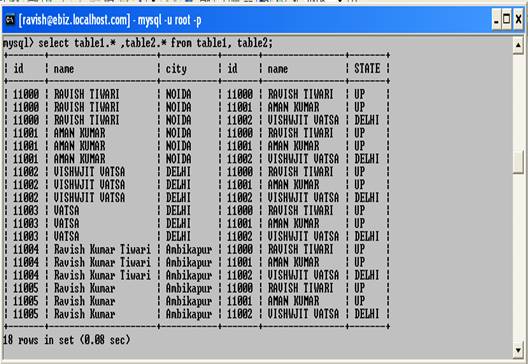
| For example, if you join table1 and table2 as follows, each row in ttable1 is combined with each row in table2: | |||
| select table1.* ,table2.* from table1, table2; | |||
|
|||
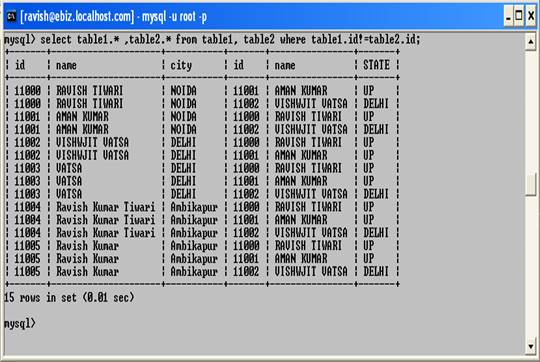
| A full join is also called a cross join because each row of each table is crossed with each row in every other table to produce all possible combinations. This is also known as the cartesian product. Joining tables this way has the potential to produce a very large number of rows because the possible row count is the product of the number of rows in each table. A full join between three tables that contain 100, 200, and 300 rows, respectively, could return 100x200x300 = 6 million rows. That's a lot of rows, even though the individual tables are small. In cases like this, a WHERE clause will normally be used to reduce the result set to a more manageable size. | |||
| Consider the following query: | |||
| select table1.* ,table2.* from table1, table2 where table1.id!=table2.id; | |||
|
|||
| The JOIN and CROSS JOIN join types are equivalent to the ',' (comma) join operator. | |||
| For example, the following statements are all the same: | |||
| SELECT table1.*, table2.* FROM table1, table2 WHERE table1.id = table2.id; SELECT table1.*, table2.* FROM table1 JOIN table2 WHERE table1.id = table2.id; SELECT table1.*, table2.* FROM table1 CROSS JOIN table2 WHERE table1.id = table2.id; |
|||
| Normally, the MySQL optimizer considers itself free to determine the order in which to scan tables to retrieve rows most quickly. On occasion, the optimizer will make a non-optimal choice. If you find this happening, you can override the optimizer's choice using the STRAIGHT_JOIN keyword. A join performed with STRAIGHT_JOIN is like a cross join but forces the tables to be joined in the order named in the FROM clause. | |||
| STRAIGHT_JOIN can be specified at two points in a SELECT statement. You can specify it between the SELECT keyword and the selection list to have a global effect on all cross joins in the statement, or you can specify it in the FROM clause. | |||
| SELECT STRAIGHT_JOIN ... FROM table1, table2; SELECT ... FROM table1 STRAIGHT_JOIN table2; |
|||
| Left and Right Joins | |||
| An equi-join shows only rows where a match can be found in both tables. Left and right joins show matches, too, but also show rows in one table that have no match in the other table. The examples in this section use LEFT JOIN, which identifies rows in the left table that are not matched by the right table. RIGHT JOIN is the same except that the roles of the tables are reversed. (RIGHT JOIN is available only as of MySQL 3.23.25.) | |||
| A LEFT JOIN works like this: | |||
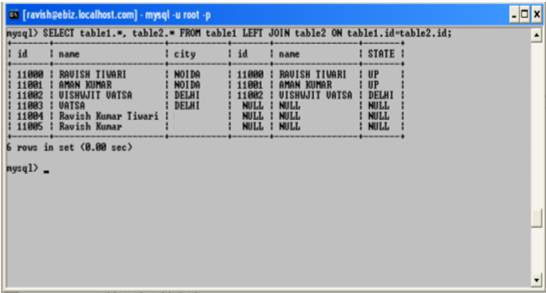
| You specify the columns to be used for matching rows in the two tables. When a row from the left table matches a row from the right table, the contents of the rows are selected as an output row. When a row in the left table has no match, it is still selected for output, but joined with a "fake" row from the right table in which all the columns have been set to NULL. In other words, a LEFT JOIN forces the result set to contain a row for every row in the left table whether or not there is a match for it in the right table. The rows with no match can be identified by the fact that all columns from the right table are NULL. | |||
| SELECT table1.*, table2.* FROM table1 LEFT JOIN table2 ON table1.id=table2.id; | |||
|
|||
|
|||