| Multimedia and Games |
| |
| Playing a Song on Linux |
| |
| Apart from being able to view and create graphics and other images, the PC is capable of supporting a wide range of audio and video features and facilities. These include the playing of audio CDs, audio digital files, VCD and DVD as well as multimedia games. |
| |
| While support may be available in the software, the necessary hardware has to be available before these multimedia facilities can be used, e.g. a DVD drive is required to be present on the system before you can play a DVD. By default most modern PCs come with a CD-ROM drive capable of playing audio CDs and VCDs as well as a soundcard and speakers. |
| |
| Note: |
| |
| Linux Doesn't support MP3 or any such patented audio/video format to avoid controversies, you can buy mp3 codec support later. Many of the format available in the market are not free and belongs to their owners and their licensing terms are not compatible with GNU GPL(General Public License) or other such licenses, thus they tries to impose restrictions on source code distribution and tries to limit your freedom. |
| |
| Linux does not include them to maintain is vision Free software for everyone. I accept this situation can be very annoying some time but trust me Linux community is working harder than the hardest to patch-up and overcome these issues. We hope that coming Linux versions will have better user experience especially is the field of Audio/Video format support. |
| |
| Playing a song with XMMS |
| |
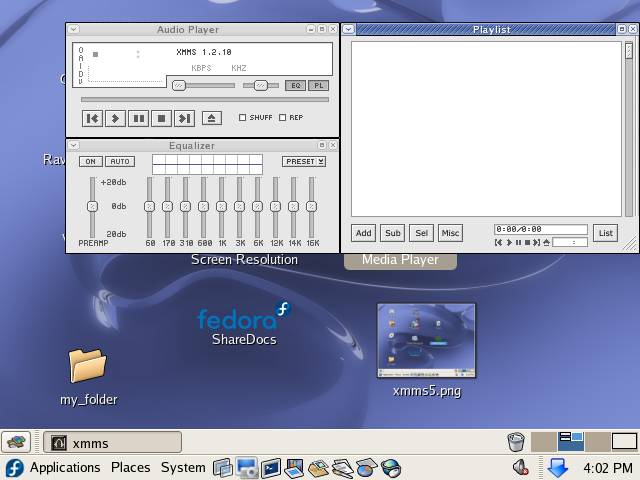
| To start XMMS player type xmms (all small) at the prompt and press enter. |
| |
|
| |
| This is XMMS media player. |
| |
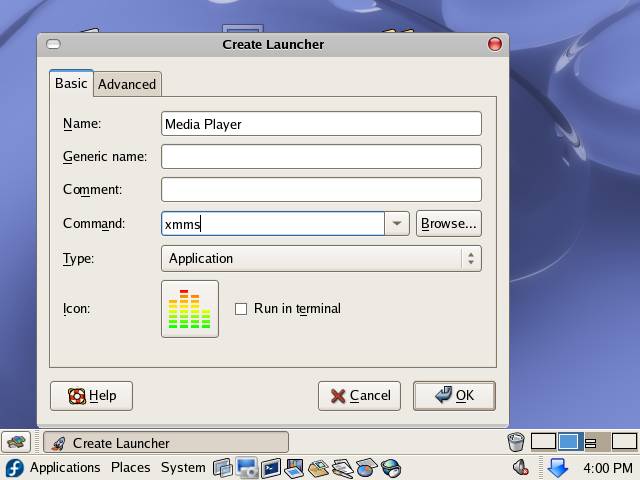
| Or you can also create a desktop shortcut for easy access. To create a desktop shortcut right-click on the desktop and select Create Launcher from the shortcut menu |
| |
|
| |
| In the Name field type the display name for the shortcut and in the Command field type xmms select an icon for your shortcut and click on OK to create the shortcut. |
| |
| To play a song with XMMS, do the following: |
| |
| 1. Start the XMMS player either by clicking on desktop shortcut or by typing xmms at the prompt. |
| |
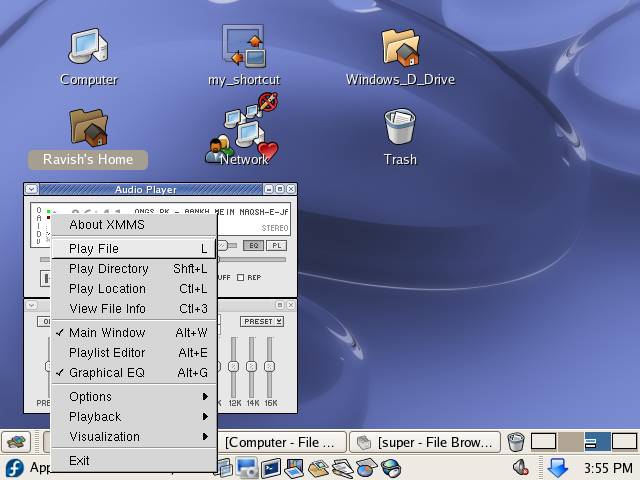
| 2. Right-click in the XMMS player area and select Play File and locate the file that you want to play |
| |
|
| |
| To add the whole directory to the playlist select Play Directory and from the directory selector select the directory that you want to add. |
| |
|
| |
| XMMS is one of the best player available in the world of Linux. |
| |
| Note: |
| |
If you don't have XMMS installed on your system you can install XMMS by running the following yum command:-
yum install xmms xmms-mp3 xmms-faad2 gstreamer-plugins-uglylibmad libid3tag this command requires active internet connection. |
| |
| Click here to Download some OGG songs . |
| |
| |
| |
| |
| |


