Working with Terminal/Shell
 
Using GNU nano editor
 
nano is a curses-based text editor for Unix and Unix-like systems, licensed under the GNU General Public License. It is a clone of Pico, the editor of the Pine email client. Instead of being mouse-oriented, nano, like Pico, is controlled with control keys.
 
For example, Control-O saves the current file; Control-W goes to the search menu. nano puts a two-line "shortcut bar" at the bottom of the screen, listing many of the commands available in the current context. For a complete list, Control-G gets the help screen.
 
img
 
Starting and using nano
 
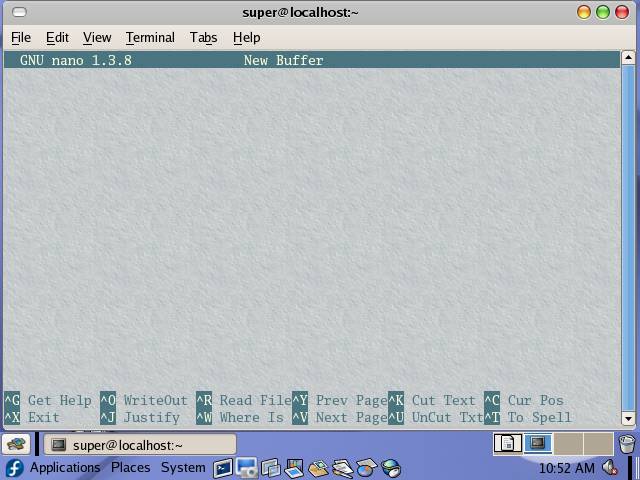
To start nano editor type nano at the prompt and press enter:
 
this is nano interface
 
In my personal opinion working with nano is quite simpler than working with vi/Vim editors. Its fast,simple and easy to use even for the first timers.
 
img
 
Starting with GNU nano

to start nano and edit a file (new or existing)

nano hello.txt

to start nano and open a new file
 
nano
 
Nano shortcuts:
 

Ctrl+G(^G) : Help

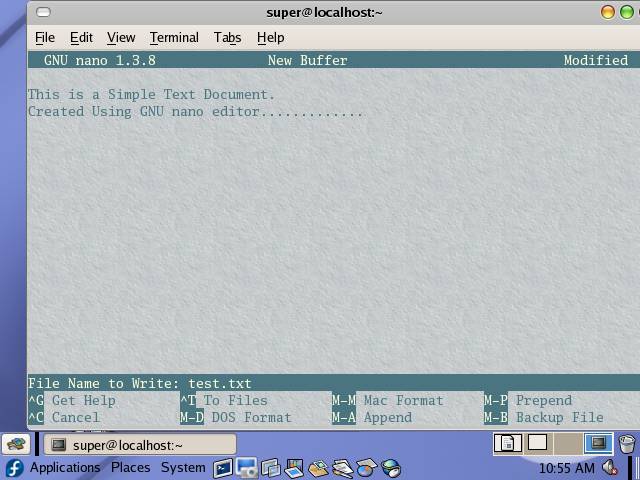
Ctrl+O(^O) :Write Out(Save file)

Ctrl+R(^R) :Read File(Open file)

Ctrl+W(^W) :Search

Ctrl+X(^X) :Exit nano

Ctrl+Y(^Y) :Previous Page

Ctrl+V(^V) :Next Page

Ctrl+K(^K) :Cut Text

Ctrl+U(^U) :Paste (Uncut Text)
 
 
img
 
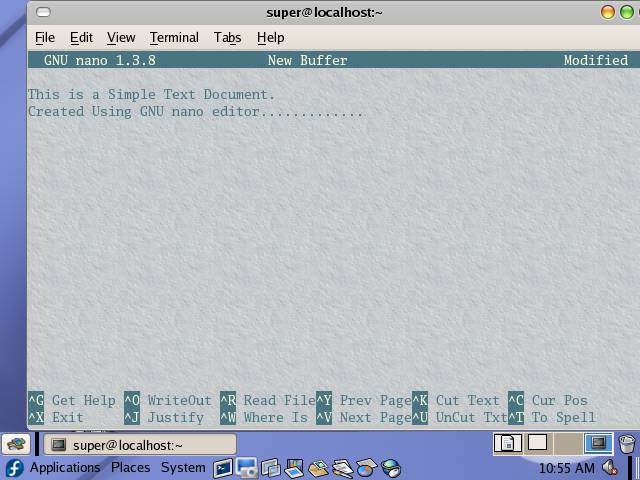
after making changes in the file press Ctrl+O to save the file.