| Working with Internet |
| |
| File Download |
| |
| The internet is full of sights to see and things to do like listen to sounds, view movies, play interactive educational games and transfer applications to your own computer like virus checkers, drawing programs, screen capturing programs and much more. |
| |
| In order to get and run these files you need to learn how to download and set them up on your own computer. Downloading refers to the actual transferring of the document from the internet to your own computer. |
| |
| Before You Start Downloading |
| |
| Know Your System |
| |
| Firstly you must make sure that you know what type of software is appropriate for your computer. That is you must know the specifications of your computer. Things like whether you are using a Personal Computer (PC) or a Mac (Macintosh) and if you are using a PC whether you are using Windows 3.1, Windows 95 or Windows NT as your operating system. |
| |
| You also need to know how much memory you have and whether the machine is a 486 or pentium if it is a PC. The type of computer, the operating system and specifications of your computer dictate what type of programs you can run on your computer. |
| |
| You may not have the capacity to run certain software or the software may not be available for the platform you are using and downloading it can be a complete waste of time. |
| |
| Set up a separate download directory |
| |
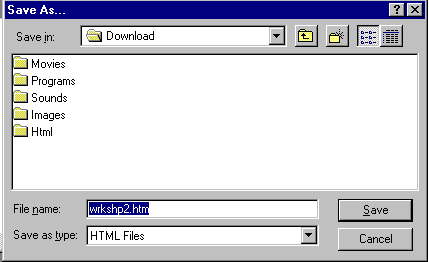
| Setting up a separate download directory to store your downloaded files into is so they don't get mixed up with any other programs/files on your system, and so you always know where you can find them should you have to reinstall or find the files at a later date. |
| |
| Normally with software you receive on a disk the separate directory is the files on the disk and the file runs through it setup functions and creates a directory where the program will sit. By creating this download directory you are saving a lot of clean up time later. |
| |
| . Most files you download will also be in a compressed format and when uncompressed will explode into many other files. By separating them you are able to clean up your file directories at a later stage with greater ease. |
| |
| If you are using Windows 95 you have the ability to create a new directory immediately to store the file in otherwise store them all in a download directory. You could create sub directories like that below. |
| |
 |
| |
| File Extensions |
| |
| Look at the file extension of the file you want to download Files like this one you are reading - download.htm have two parts separated by the (.). The name of the file refers to the first part, the file extension refers to the second part. |
| |
| The file extension is usually three letters and can be used to identify the type of file that it is. In this example download.htm means it is a hypertext markup language document (html). |
| |
| As you become more familiar with the internet and different file extensions you will be able to identify their file types and what you need to run them. A comprehensive list of file extensions and There are an amazing array of different file types around, you would probably be familiar with some more common ones such as word.doc and word.txt. Word.doc is a word document and word.txt is a plain text document. |
| |
| Compressed Files |
| |
| Compressed files are a way of storing many files into one, or making a big file smaller so by making it smaller it is quicker to download. For PC users the most common file extensions are zip files and exe files and for Macintosh users sea and hqx. |
| |
| Exe and Sea files are self extracting archives, that means you don't need other software to uncompress them and when you click on them in your file managing program they will automatically either run a setup program, explode into a larger file or explode into several files. |
| |
| . All files can be compressed into these formats including all your sounds movies and programs to run them. |
| |
| For Zip and Hqx files you will need other programs to decompress/unzip/expand them. For PC users winzip is the most popular and for Mac users stuffit expander. |
| |
| Once you have this additional software you will be able to uncompress the files just by clicking on them in your file managing software. They will decompress onto your computer in the same manner as the exe and sea files. |
| |
| |
|
| |
| |


