| Drawing in Indesign |
| |
| Frames and Objects |
| |
| Pasting an object or objects inside frame |
| |
• Select the object or objects.
• To paste two or more objects inside a frame, group them first.
• Select a path or frame, choose Edit > Paste Into. |
| |
| Fit an object to frame |
| |
• Select the frame of the object.
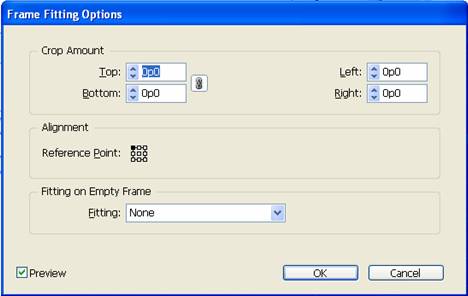
• Choose Object > Fitting and one of the following options: |
| |
 |
| |
| Fit Content To Frame |
| |
| Resizes content to fit a frame and allows the content proportions to be changed. The frame will not change, but the content may appear to be stretched if the content and the frame have different proportions. |
| |
| Fit Frame To Content |
| |
| Resizes a frame to fit its content. The frame’s proportions are altered to match the content proportions, if necessary. This is useful for resetting a graphics frame that you accidentally altered. |
| |
| Center Content |
| |
| Centers content within a frame. The proportions of the frame and its content are preserved. The size of the content and frame are unaltered. |
| |
| Fit Content Proportionally |
| |
| Resizes content to fit a frame while preserving the content proportions. The frame’s dimensions are not changed. If the content and the frame have different proportions, some empty space will result. |
| |
| Fill Frame Proportionally |
| |
| Resizes content to fill the entire frame while preserving the content’s proportions. The frame’s dimensions are not changed. If the content and the frame have different proportions, some of the content will be cropped by the bounding box of the frame. |
| |
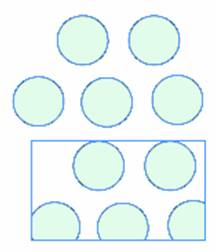 |
| FIG. A group of objects is placed inside a rectangular frame. |
| |
| Moving of object in frame |
| |
To move a frame together with its content, use the Selection tool . .
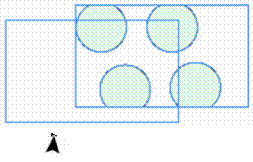
To move imported content without moving the frame (that is, to pan content behind its frame), use the Direct Selection tool . The Direct Selection tool automatically changes to the Hand tool when placed over an imported graphic, but not when placed over text or vector graphics created in InDesign. . The Direct Selection tool automatically changes to the Hand tool when placed over an imported graphic, but not when placed over text or vector graphics created in InDesign. |
| |
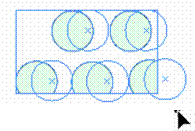 |
| FIG. Moving of Graphic inside frame without moving frame with the help of Direct Selection Tool. |
| |
 |
| |
| FIG. Moving of Frame without moving graphic with the help of Direct Selection Tool. |
| |
|
| |


