| Drawing in Indesign |
| |
| Effects of Indesign |
| |
| Effects Panel |
| |
| To view Effects Panel Go to Windows > Effects. |
| |
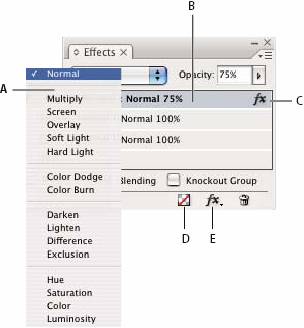 |
| A. Blending mode
B. Levels
C. FX icon
D. Clear effects
E. FX button |
| |
| Blending Mode |
| |
| Determines colors in transparent objects to interact with the objects behind them. |
| |
| Opacity |
| |
| For the opacity of an object, stroke, fill, or text. |
| |
| Level |
| |
| Indicates opacity settings of Object, Stroke, Fill, and Text and effects applied. Click the triangle to the left of the word Object to hide or display these level settings. The FX icon appears after you apply transparency settings, and now you can double-click the FX icon to edit the settings. |
| |
|
Isolate Blending |
| |
| Can be applied to a selected group of objects. |
| |
| Knockout Group |
| |
| Makes the opacity and blending attributes of every object in a group knock out, or block out, underlying objects in the group. |
| |
| Clear All button |
| |
| Clears effects—stroke, fill, or text— from an object, sets the blend mode to Normal, and changes the Opacity setting to 100% throughout the object. |
| |
| FX button |
| |
| Displays a list of transparency effects. |
| |
| Transparency effects |
| |
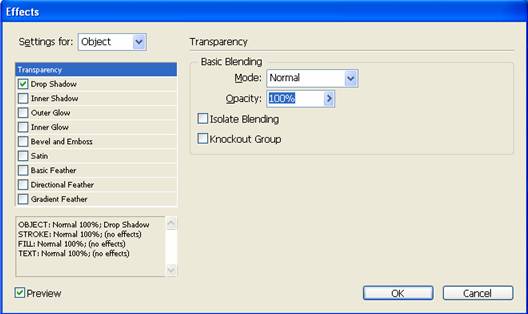
| InDesign has nine transparency effects. To apply these effects select object and then go to Window> Effects. |
| |
 |
| |
| Drop Shadow |
| |
| Adds a shadow that falls behind the object, stroke, fill, or text. |
| |
| Inner Shadow |
| |
| Adds a shadow that falls just inside the edges of the object, stroke, fill, or text, giving it a recessed appearance. |
| |
| Outer Glow and Inner Glow |
| |
| Add glows that emanate from the outside or inside edges of the object, stroke, fill, or text. |
| |
| Bevel and Emboss |
| |
| Adds various combinations of highlights and shadows to give text and images a three-dimensional appearance. |
| |
| Satin |
| |
| Adds interior shading that makes a satiny finish. |
| |
| Basic Feather, Directional Feather, and Gradient Feather |
| |
| Soften the edges of an object by fading them to transparent. |
| |
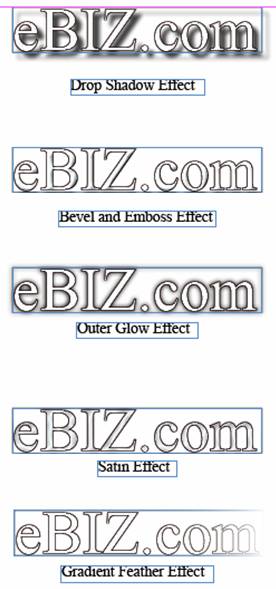 |
| Figure showing different type of effects applied on text. |
| |
|
| |


