2. Choose Object > Paths > Make Compound Path. A hole appears wherever selected paths overlap.
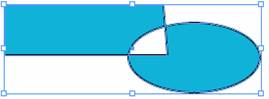
2. Choose Object > Paths > Release Compound Path.
2. Choose Object > Paths > Reverse Path.
Click Window > Object & Layout > Pathfinder.
Select two objects or path to create compound Paths.
Click on any of the following pathfinder buttons:
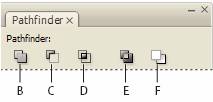
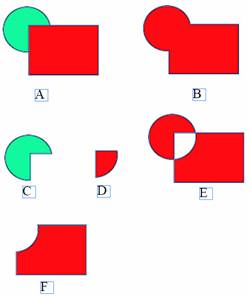
C. Subtract Objects in the front “punch holes? in the backmost object.
D. Intersect Creates a shape from overlapping areas.
E. Exclude Overlap Creates a shape from areas that do not overlap.
F. Minus Back Objects in the back “punch holes? in the frontmost object.
 |
 |
 |